Congratulations on purchasing your new Plantronics product. This guide contains instructions
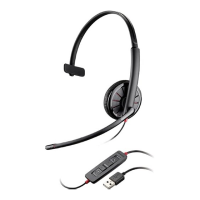
for setting up and using your Blackwire C510/C520 headset.
Please refer to the safety instructions in the quick start guide for important product safety
information prior to installation or use of the product.
Computer
• Supported operating systems: Windows
®
7, Windows
®
8, Windows XP
®
, Windows Vista
®
• Processor: 400 MHz Pentium
®
processor or equivalent (Minimum); 1 GHz Pentium processor or
equivalent (Recommended)
• RAM: 96 MB (Minimum); 256 MB (Recommended)
• Hard disk: 280 MB (Minimum); 500 MB or more (Recommended)
• Microsoft Windows XP - Service Pack 3 (SP3) or later (Recommended) Microsoft Windows
Vista - Service Pack 1 (SP1) or later (Recommended)
Display
• At least 800 x 600, 256 colours
• 1024 x 768 high colour, 32-bit (Recommended)
Browser
• Internet Explorer
®
V6 or better must be on the user’s system (Required)
Visit our web site at www.plantronics.com/support for technical support including frequently
asked questions, compatibility and accessibility information.
Welcome
System requirements
NEED MORE HELP?
3







 To Next Page