E-18
Connecting Personal Computers and Video Equipment
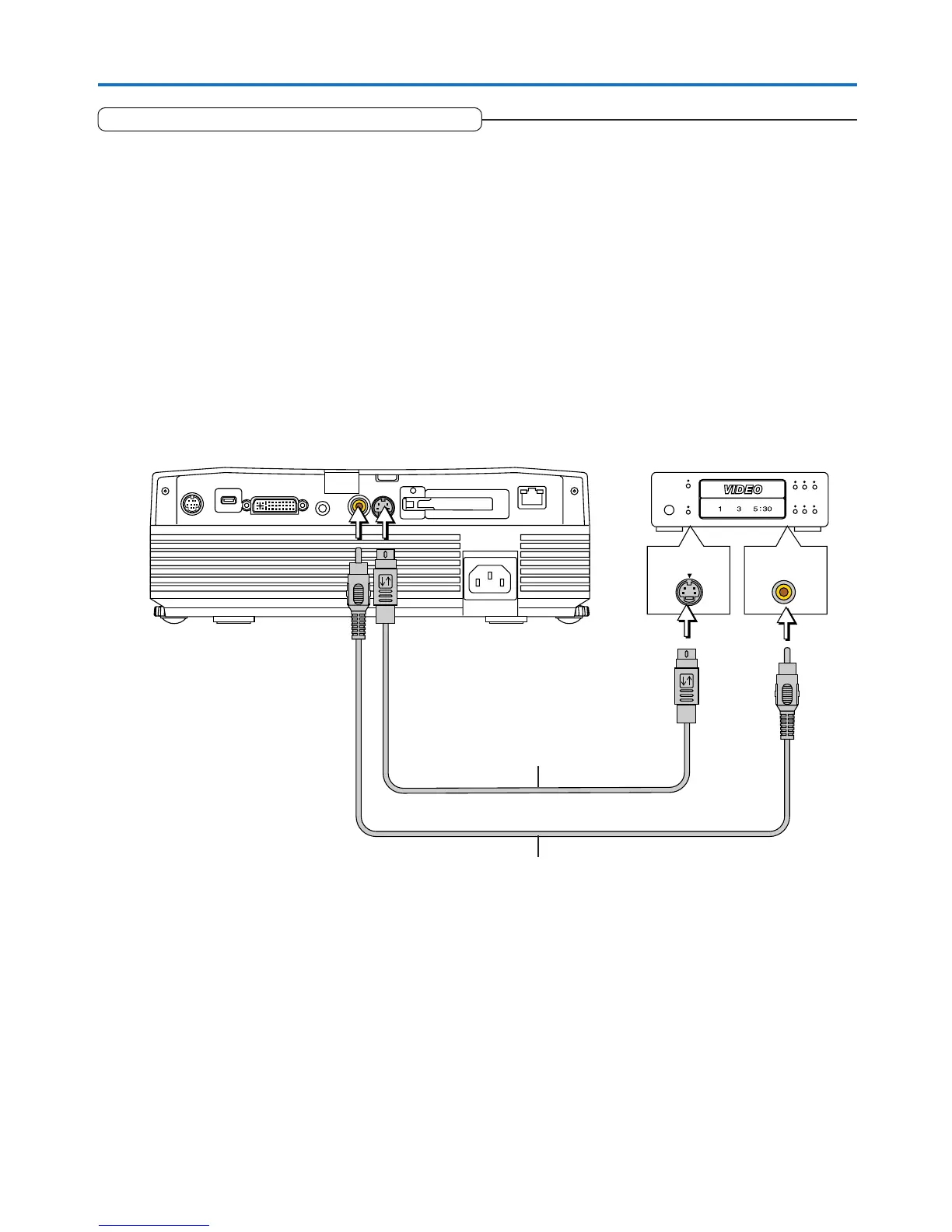
VIDEO
S-VIDEO
Connections with Composite Signals
Video Equipment with VIDEO Connectors
• Make the connection to the VIDEO connector of the projector using the supplied Video cable.
• The input setting of the VIDEO connector has been set to “Auto” at the factory; however, if the projector does not project, please
change the input setting to “Your Country’s Television Broadcast System” using the menu sequence of [Setup] → [Input Format]
→ [Video].
See “Input Format” on Page E-52.
Video Equipment with S-VIDEO Connectors
• Make the connection to the S-VIDEO connector of the projector using the supplied S-video cable.
• The input setting of the S-VIDEO connector has been set to “Auto” at the factory; however, if the projector does not project,
please change the input setting to “Your Country’s Television Broadcast System” using the menu sequence of [Setup] → [Input
format] → [S-Video].
See “Input Format” on Page E-52.
Video cable (Supplied item)
Video deck, DVD player, document
camera, etc.
S-Video cable (Suppled item)


 To Next Page