3
System Requirements
1
PC with Intel Pentium
®
IV 2GHz processor or compatible
512 MB RAM
Available USB 2.0 port
DVD-ROM Drive
800 MB Free Hard Disk Space (1GB Recommended)
Operating System: Windows XP / Vista / 7 / 8 / 10
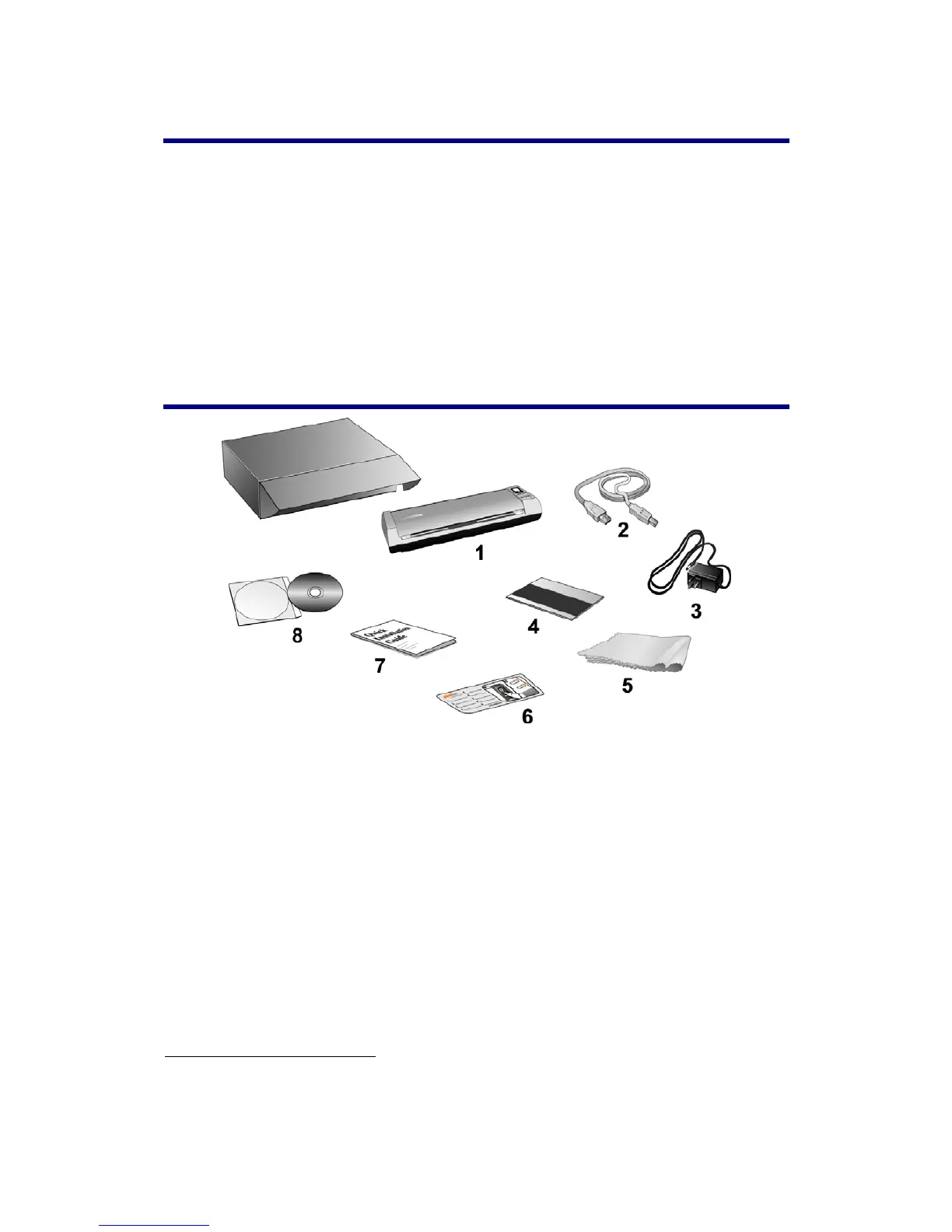
Box Contents
2
1. Scanner
2. USB Cable
3. AC Adapter
4. Calibration Sheet
5. Soft, lint-free cloth
6. Memo Sticker
7. Quick Guide
8. Setup/Application DVD-ROM
1
Higher requirements might be needed when scanning or editing a large quantity of image data.
The system requirements here are only a guideline, as in general the better the computer
(motherboard, processor, hard disk, RAM, video graphic card), the better the results.
2
Save the box and packing materials in case you need to transport this scanner in the future.
The product packaging can be recycled.







 To Next Page