Channels
Using Zones
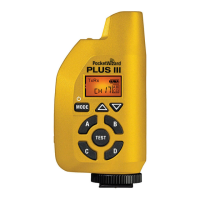
The Plus IIIe Transceiver su
orts 32 different E
hannels and 80 different LR
hannels.
Each
hannel represents a di
ital code transmitted on specifi c PocketWizard radio
requencies. This enables many photo
raphers to work in the same area or
or one
photo
rapher to exclusively control di
erent sets o
receivers. A Plus IIIe will tri
er any
number of receivin
PocketWizard radios set to the same Channel. Radios set to different
Channels will not tri
er each other
Press the
hannel u
down buttons to chan
e
hannels
Zones can be used to to
le remote cameras or
ashes on or o
rom a transmittin
PocketWizard radio. Zones can also be used when sharin
lashes with another
photo
rapher so only some o
the remote
ashes are shared, even when usin
the
m
h
nn
l
Zones A, B,
, and D are selectable via the Plus IIIe’s Zone To
le Buttons and are
v
il
l
n
ll E
n
LR
h
nn
l
. Th
ena
e
ones are
s
a
e
n a
ox on t
e
ri
ht side of the LCD. You can enable any combination of all four Zones. A receivin
Plus IIIe will only tri
er i
the transmittin
PocketWizard radio has at least one
matc
n
one ena
e
N
TE
If you choose to down
rade to Le
acy fi rmware, Channels and Zones will operate
di
erentl
. Please see wiki.PocketWizard.com
r
t
il
NOTE: This PocketWizard Plus IIIe uses the new E Release fi rmware. This protocol will not work with
Legacy fi rmware. This Plus IIIe can be downgraded via the Utility to work with Legacy fi rmware. Please
see
wiki.PocketWizard.com
for more information.
32
E Channels
80
LR Channels
Channels and Zones



 To Next Page