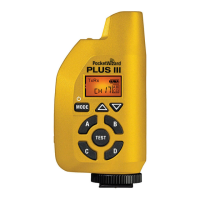
Plus IIIe Transceiver Basics
t
z
r
.
m
PocketWizard Compatibility
PocketWizard uses two di
erent
amilies o
rmware to control their radio: Le
acy and
E Release. The
rmware installed in this Plus IIIe is the E Release and
our radio is a
member of the PocketWizard E Series famil
. The E Release uses a new communication
protoco
t
at ena
es your
us
e to
ave
reater ran
e, en
ance
re
a
ty, an
more
eatures than a Plus III usin
the Le
acy
rmware.
s
us
e w
wor
w
t
any ot
er
oc
et
zar
t
at
as
een up
ra
e
to
e
ease
fi r m w a r e o p e r a t i n
on the same frequency. PocketWizard offers two frequencies: F
f
r N
rth
n
th Am
ri
n
E v
r
i
n
f
r m
t
f th
r
t
f th
w
rl
. E
ri
rmware will not work with Le
acy
rmware but the Plus IIIe can be down
raded to the
Le
acy
rmware to work with Le
acy PocketWizard radios
such as the Plus II, MultiMAX,
FlexTT5, etc
. It can be up
raded a
ain as o
ten as you like at no additional cost. Your
ex
st
n
ra
os may
e up
ra
ea
e.
I
you choose to down
rade your Plus IIIe to Le
acy
rmware, some
unctions and
settin
s may operate di
erently. Please re
er to wiki.pocketwizard.com
or a list o
compatible radios, in
ormation on how to up
rade or down
rade your PocketWizards
usin
the PocketWizard Utility, and how to use Le
acy
rmware with your Plus IIIe
Channels & Zones
r Pl
III
n
t
n th
m
h
nn
l
n
Z
n
th
r P
k
tWiz
r
r
i
to work to
ether. Channels can be set via the Plus IIIe’s Channel up/down buttons
The Plus IIIe has 4 Zones
ABCD
. See “Channels & Zones” section
p
. 15
for more info



 To Next Page