12
OPTION A: SET UP WITH YOUR COMPUTER
1. Go to flow.polar.com/start and install the FlowSync software to set up your A360 and update the firm-
ware if needed.
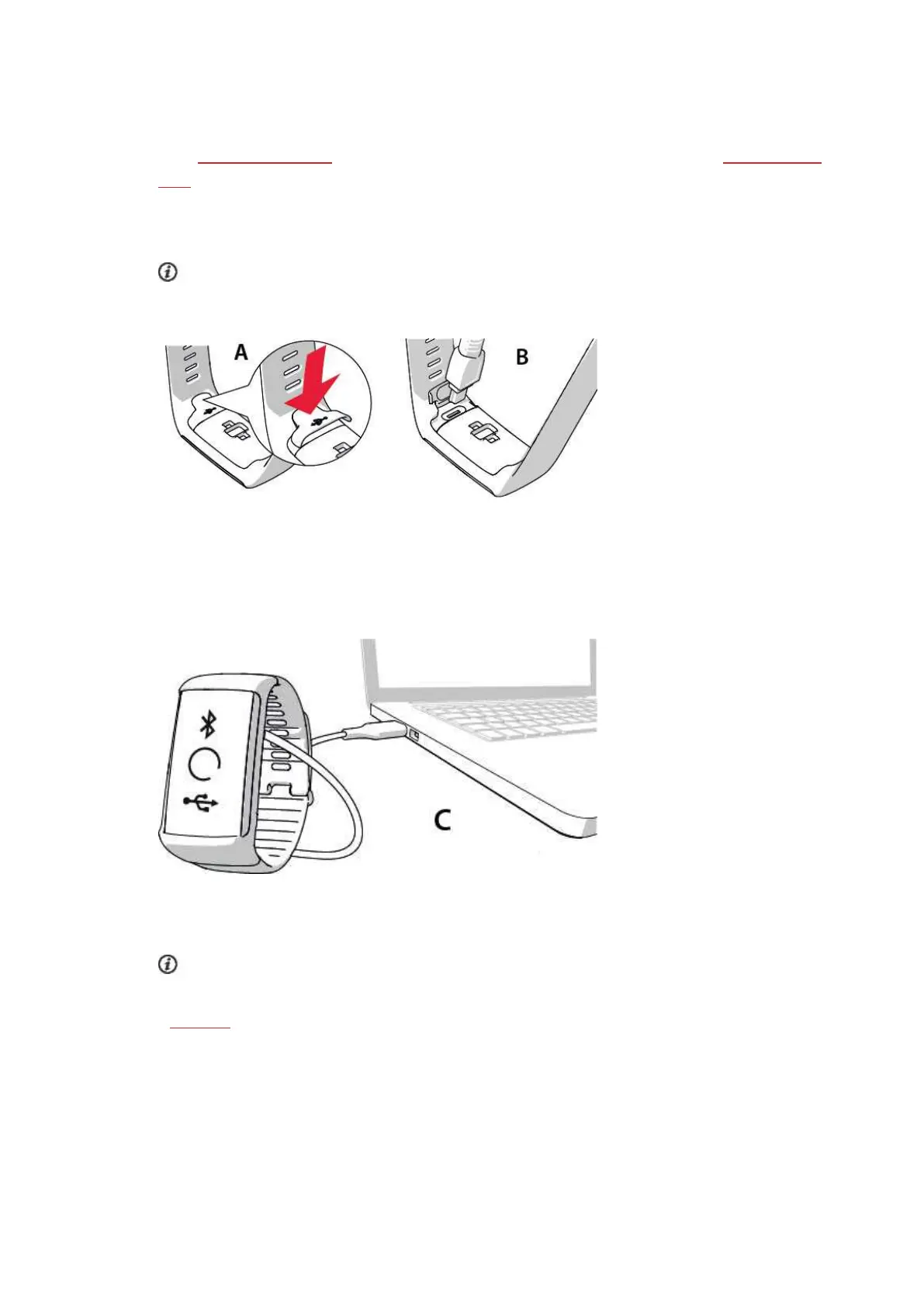
2. Push down the top part (A) of the USB cover inside the bracelet to access the micro USB port and plug
in the supplied USB cable (B).
Don't charge the device when its USB port is wet. If the USB port of your A360 has gotten wet,
let it dry up before plugging in.
3. Plug the other end of the cable into the USB port of your computer for setup and charging the battery
(C).
4. Then we’ll walk you through signing up for the Polar Flow web service and personalizing your A360.
To get the most accurate and personalized activity and training data, it’s important that you’re pre-
cise with the physical settings when signing up for the web service. When signing up, you can choose
a language and get the latest firmware for your A360.
When closing the USB cover, make sure it fits flush on the device.


 To Next Page