15
UFH8ZMP
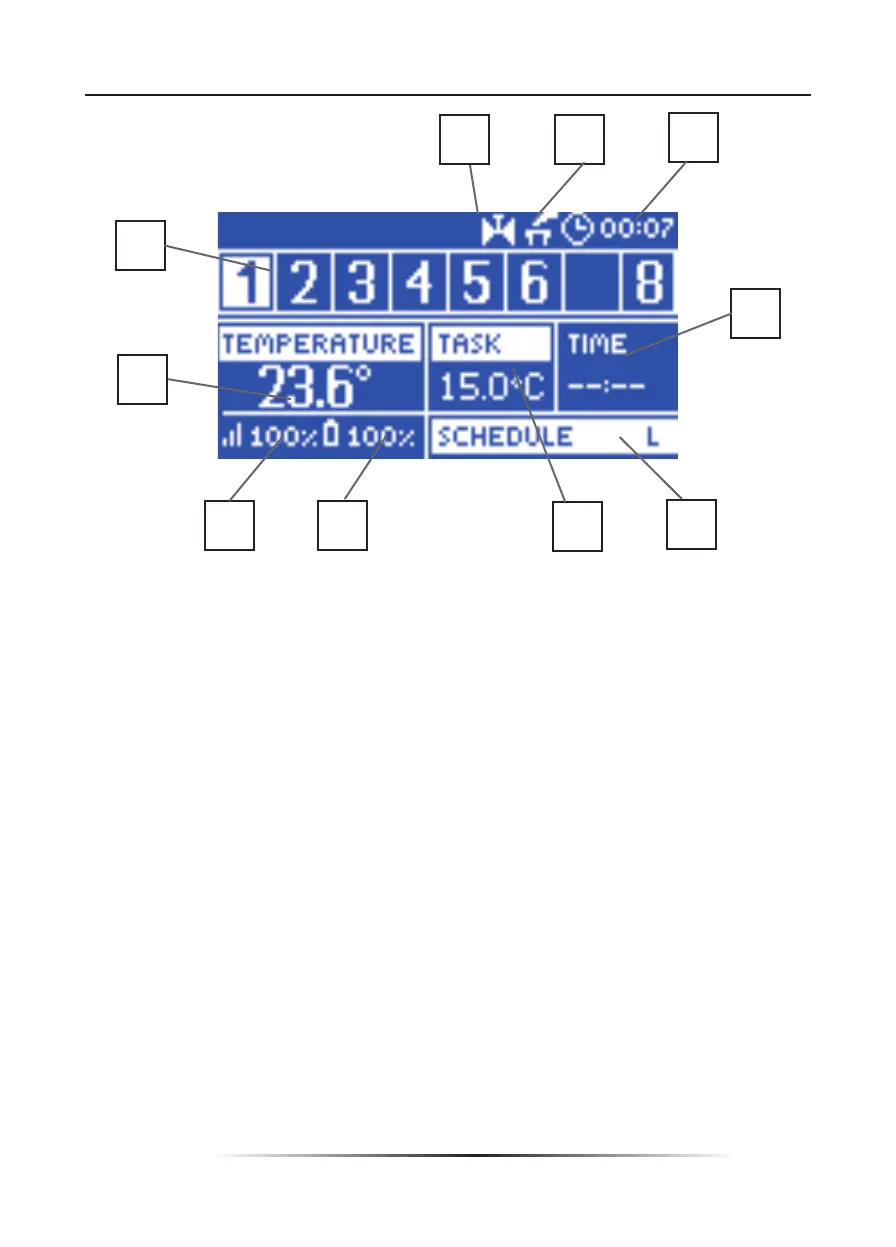
1. An icon indicating valve operation
2. An icon indicating that the additional contact is switched on
3. Current time
4. Time left until the manually set temperature in a given zone changes
5. Information about the type of current weekly schedule
6. Pre-set temperature in a given zone (backlit number in the zone bar – see: description
no. 12)
7. Sensor battery level in a given zone (backlit number in the zone bar – see: description
no. 12)
8. Sensor signal strength in a given zone (backlit number in the zone bar – see: description
no. 12)
9. Current temperature of sensor in a given zone (backlit number in the zone bar – see:
description no. 12)
10. Zone information:
The digit displayed indicates that the room sensor is connected and sends current
temperature information. If the zone temperature is too low, the digit fl ashes. In the event
of a zone alarm, an exclamation mark is displayed instead of the digit. In order to view the
operation parameters of a given zone, select its number using ▲ or ▼.
1
2
3
10
9
4
8
7
6
5



 To Next Page