Page 7www.poolpro.com.au
CONTROL PANEL OPERATION
BUTTON FUNCTION
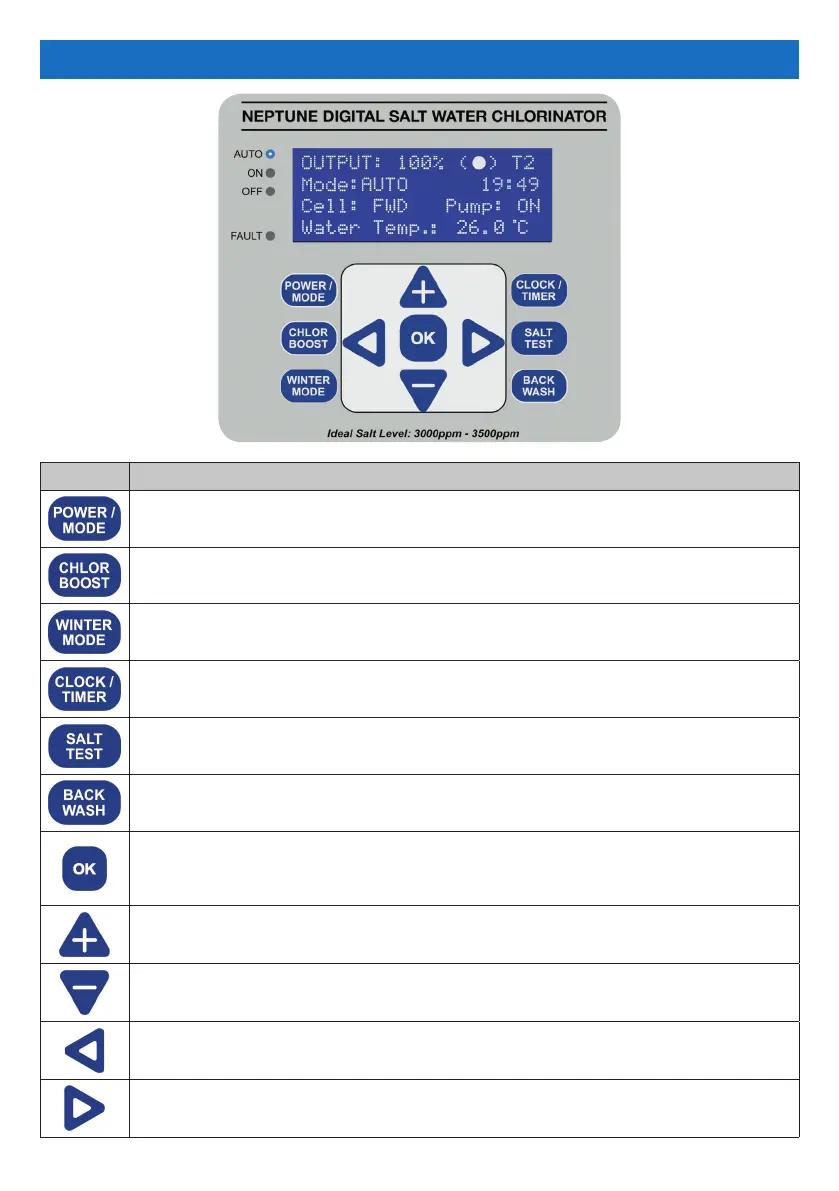
Sets the chlorinator’s operating mode between AUTO, ON and OFF.
This is displayed on the LCD screen next to “Mode”.
Sets the chlorinator and pump to operate for 8 hours at 100% output.
Defaults to 8 hours but can be modied.
Reduces the chlorine output to 50%. Defaults to 50% but can be modied.
Sets the clock (time of day) and the timer (chlorinator operating times).
Measures the salt level of the pool water. Also shows the salt value.
Runs a backwash process to clean the media inside the pool lter system.
- Enters the Main Menu if pressed when the LCD screen is displaying the
Main Screen (see section “Main Screen” on page 9).
- Saves any changes made to the settings.
- Scrolls up any menus.
- Adjusts values of any options selected.
- Scrolls down any menus.
- Adjusts values of any options selected.
- Exits menus.
- Returns to the previous screen.
Used during service by qualied Pool Pro Professionals.


 To Next Page