12
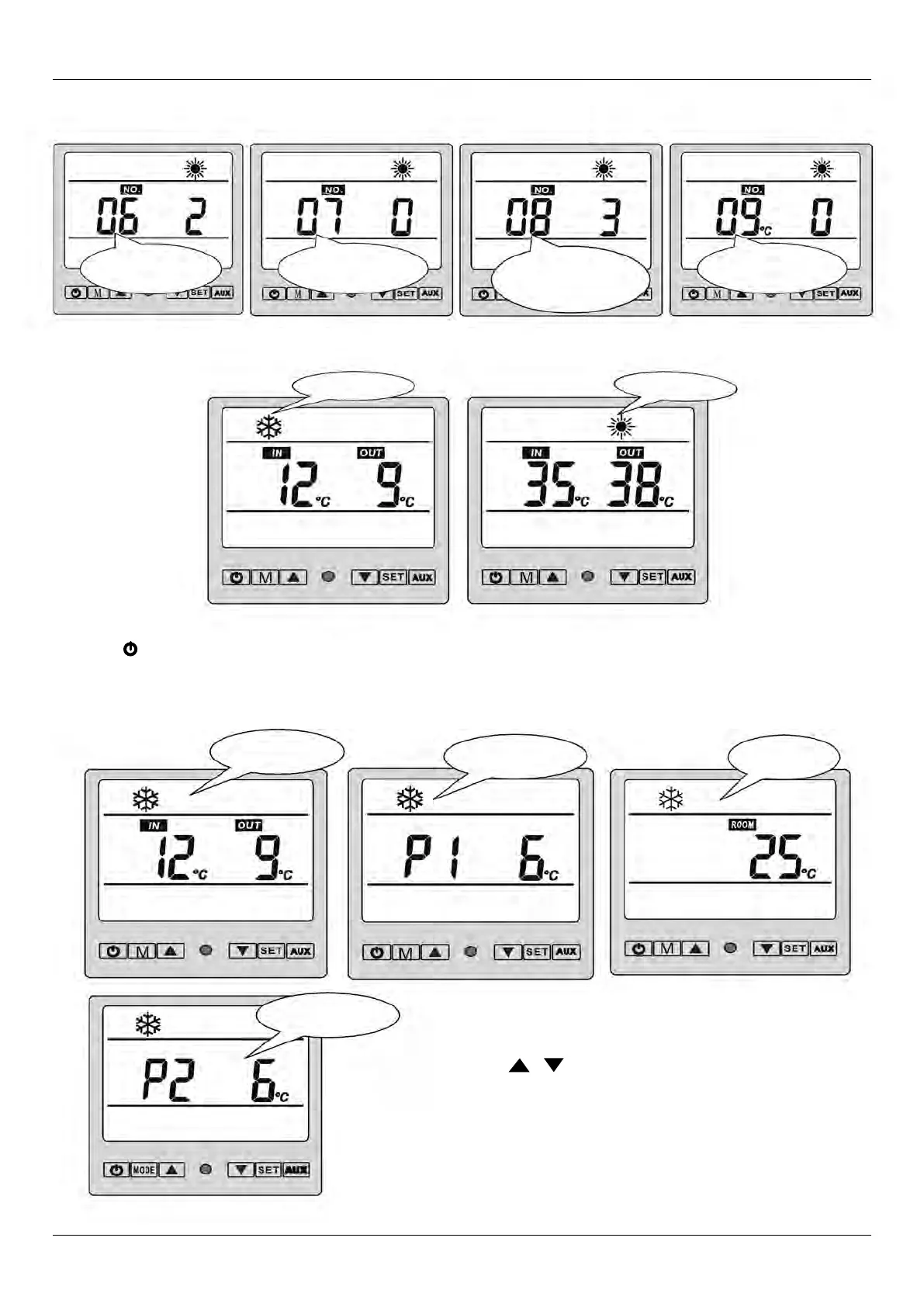
Water temp.
of inlet / outlet
Condenser 1 temp.
Ambient temp.
Condenser 2 temp.
4.5 How to know the Current Status?
4.4 How To Choose Mode
4. USAge ANd OPeRATION
• Press “M” to choose mode (mode can be changed under running)
• Press “ “ to power on unit. Under running, the LCD displays the water-in temp., water-out temp. and current mode.
• Aux. Elec. Heating – NOT APPLICABLE FOR THESE MODELS.
• Under running, press “ “ “ “ to check the current status of the unit. You
can check water-in / water-out temp, condenser temp. and ambient temp.
If no buttons are depressed within 5 seconds, the LCD will display
water-in/water-out temp. When the unit is switched off, current ambient
temperature is displayed.
Parameter 09
Heat on demand mode
1 (Yes) 0 (No).
Cooling mode
Heating mode
Parameter 06
Compressor Number
Parameter 07
Can save setting after power off
or not. 1 (Yes) 0 (No).
Parameter 08
Mode: 0. (Cooling only)
1. (Cooling & heating)
2. (Auxiliary elec. heating)
3. (Heating only)
4.3 (Continued)



 To Next Page