18
Electrical connection
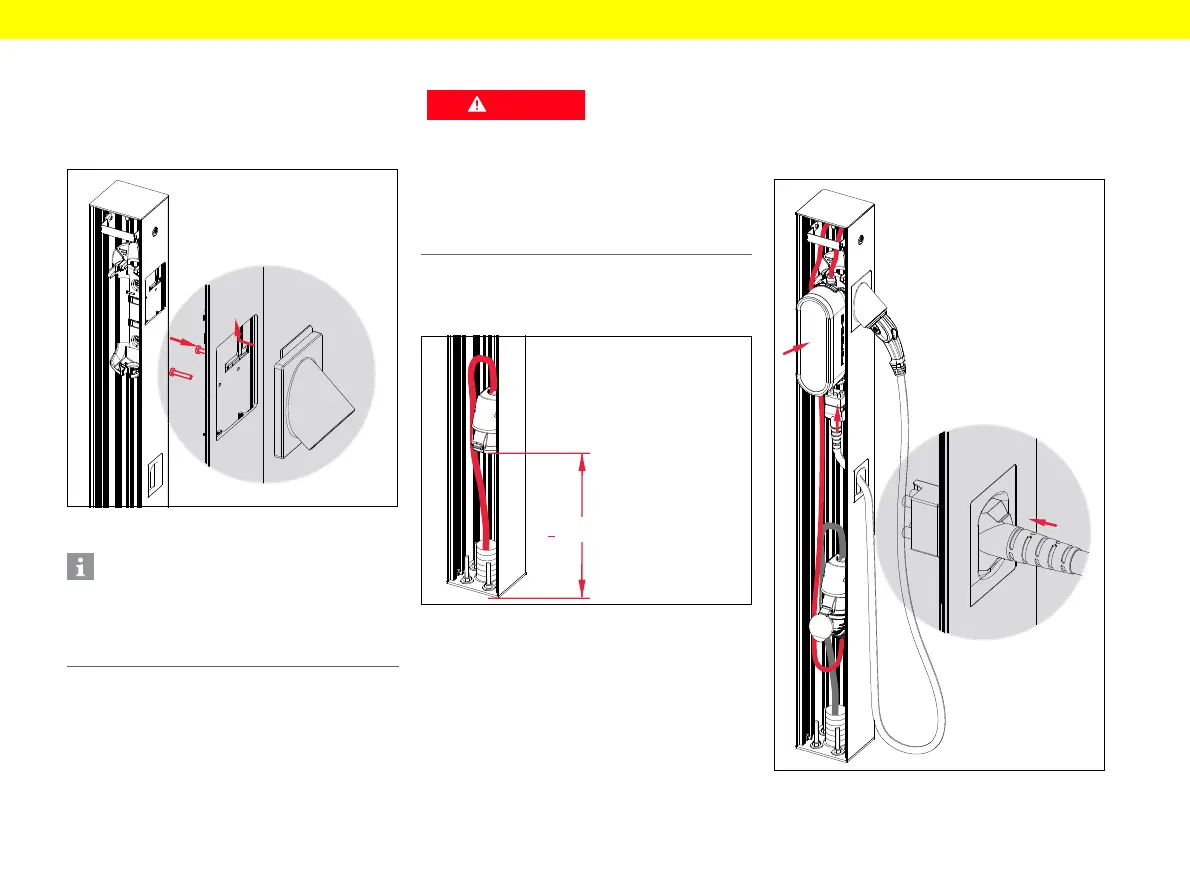
Fastening the charging plug holder
1. Push the charging plug holder into the opening
intended for this purpose.
2. Secure the charging plug holder with
two PT screws WN1452 4 x 20.
Fig. 8: Fastening the charging plug holder
Connecting the high-voltage socket
▶ Install the country-specific high-voltage socket
(minimum IP rating IP54) and connect the socket
terminals.
Fig. 9: Connecting the high-voltage socket
Attaching the
Porsche Mobile Charger
1. Lay the optional power cable in the wide groove
on the left-hand side and route up through the
cable entry.
2. Connect the power cable to the control unit.
3. Guide the plug of the vehicle cable through
the brush strip from the outside.
4. Connect the charging cable on the vehicle side
to the control unit.
5. Push the control unit into the bracket intended
for this purpose.
6. Insert the optional power cable into the high-
voltage socket or connect the mains cable.
Fig. 10: Attaching the Porsche Mobile Charger
Information
The charging plug holder is pre-assembled for
a Type 2 charging plug. By removing the two PT
screws, you can adapt the charging plug holder
for a different charging plug used in your country.
Risk of electric shock
If the laid power cable is live, touching it will cause
an electric shock that can result in severe injury
or death.
▶ Isolate it with the pre-fuse and secure so it
cannot inadvertently be switched back on.
▶ Only lay cables that are not live.



 To Next Page