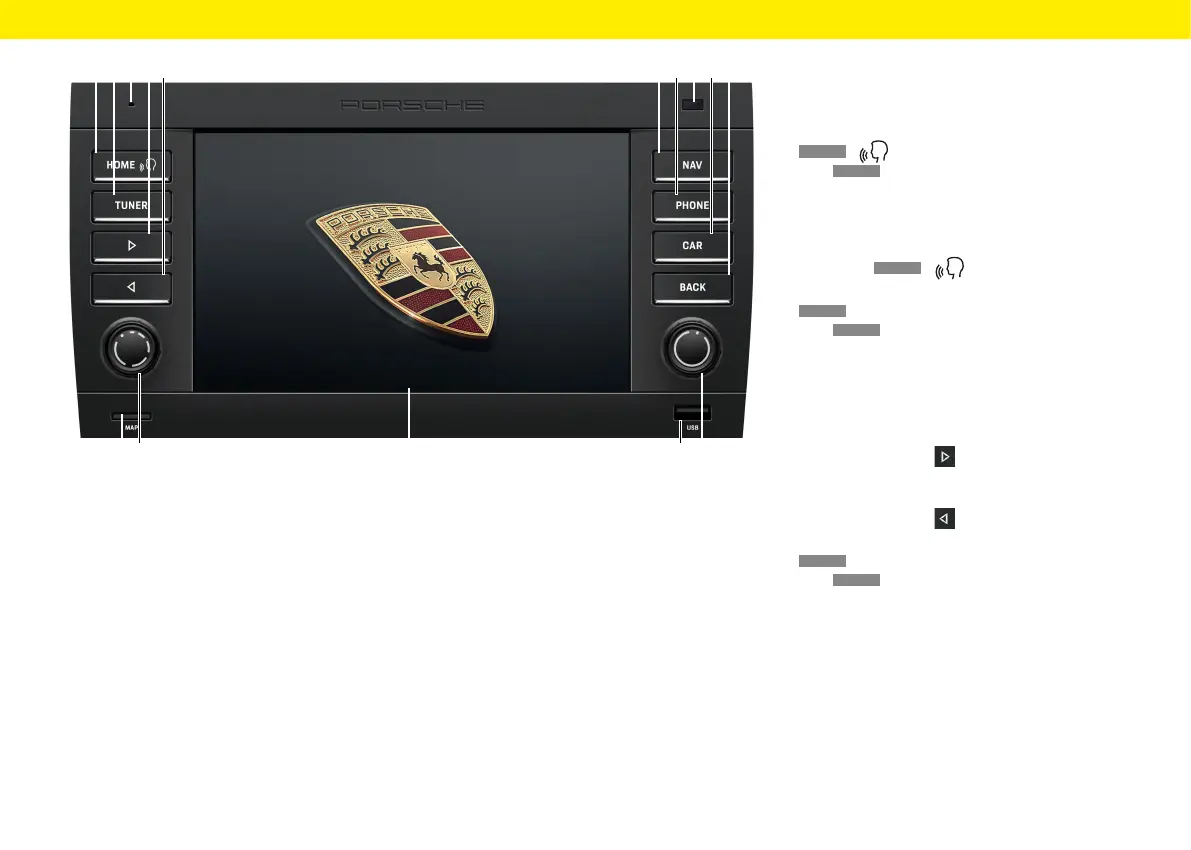
Control elements and their
functions
A
HOME
/ button
Press
HOME
to open the main menu and access
the following functions:
– Tuner – Nav – Car
– Media – Map – App
– Phone – Sound
Keeping the
HOME
/ pressed:
Activate Siri®/Google Assistant™.
B
TUNER
button
Press
TUNER
to activate radio mode and toggle
between FM/AM/DAB+.
C Microphone
The built-in microphone is designed for making
calls using the Bluetooth® hands-free system.
D Skip right
Press the Skip button
to select the next
station or track.
E Skip le
Press the Skip button
to select the previous
station or track.
F
NAV
button
Press
NAV
to activate GPS navigation mode.
For further information about the navigation
functions of the device, please refer to the sepa-
rate navigation manual.
LK
I JGF HDEBA C
ON
M
11
Overviews



 To Next Page