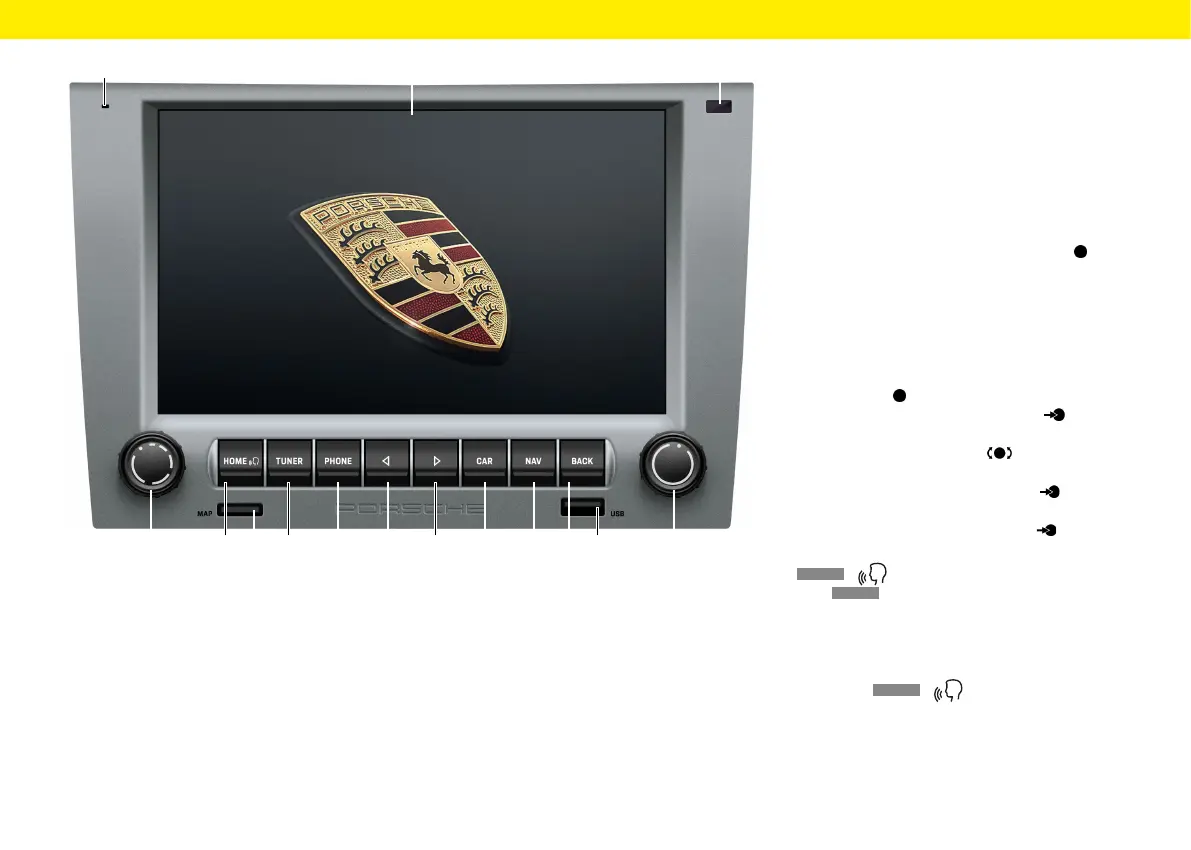
Control elements and their
functions
A Microphone
The built-in microphone is designed for making
calls using the Bluetooth® hands-free system.
B
Touchscreen
The touchscreen serves as a central control ele-
ment supplementary to the right-hand knob .
You can use the touchscreen to select any menu
option directly on the screen.
C Sensor for day/night mode
The day/night mode sensor allows the device
todetect the current lighting situation andtoad-
just the display brightness accordingly.
D Le-hand knob
– Keeping the le-hand knob pressed for
alonger time turns the device on or o.
– Turning the le-hand knob changes the
volume of the active audio source.
– Briey pressing the le-hand knob mutes
or unmutes playback.
– Briey pressing the le-hand knob can-
cels a Trac Announcement (TA).
E
HOME
/ button
Press
HOME
to open the main menu and access
the following functions:
– Tuner – Nav – Car
– Media – Map – App
– Phone – Sound
Keeping the
HOME
/ pressed:
Activate Siri®/Google Assistant™.
E F GD
A C
H
I J K
B
O
L M N
9
Overviews



 To Next Page