35
For assistance with your product, visit our website at www.portercable.com for a list of service centers, or call the
Porter-Cable Customer Care Center at (888) 609-9779.
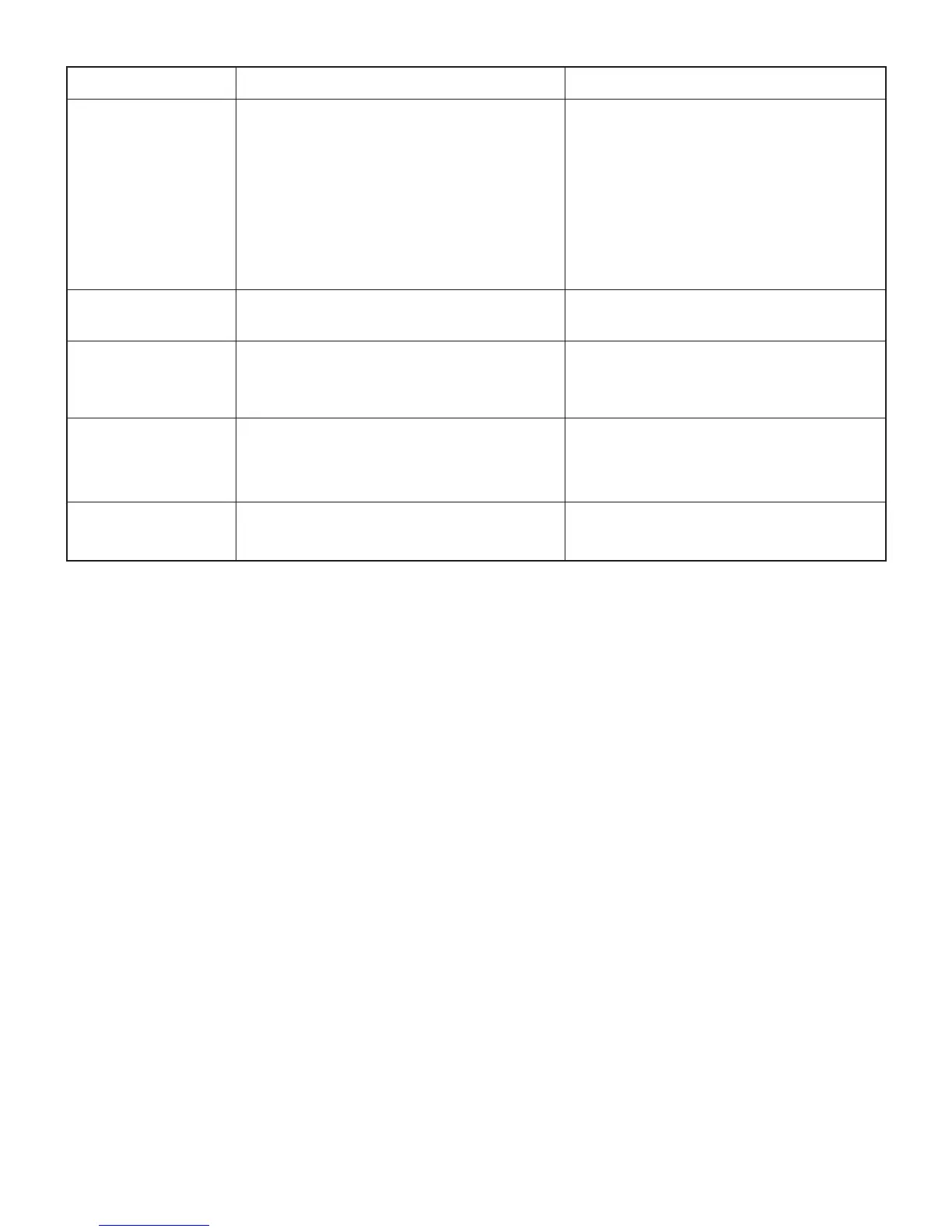
PROBLEM POSSIBLE CAUSES CORRECTIVE ACTION
Material kicked back
from blade
.
1
. Rip fence out of adjustment.
2. Riving knife not aligned with blade.
3. Feeding stock without rip fence.
4. Riving knife not in place.
5. Dull blade.
6. The operator letting go of material before it
is past saw blade.
7. Blade bevel lock handle is not tight.
1. Align rip fence with miter gauge slot.
2. Align riving knife with blade.
3. Install and use rip fence.
4. Install and use riving knife (with guard).
5. Replace blade.
6. Push material all the way past saw blade
before releasing work.
7. Tighten the handle.
Blade does not raise or
tilt freely
.
1
. Sawdust and dirt in elevation/tilting
mechanisms.
1. Brush or blow out loose dust and dirt.
Blade does not come
up to
speed. Reset trips
too easily.
1
. Extension cord too light or too long.
2. Low house voltage.
1. Replace with adequate size cord.
2. Contact your electric company.
Machine vibrates
excessively.
1
. Saw not mounted securely to workbench.
2. Bench on uneven oor.
3. Damaged saw blade.
1. Tighten all mounting hardware.
2. Reposition on at level surface.
3. Replace blade.
Does not make accurate
45°
and 90° crosscuts.
1
. Miter gauge out of adjustment. 1. Adjust miter gauge.



 To Next Page