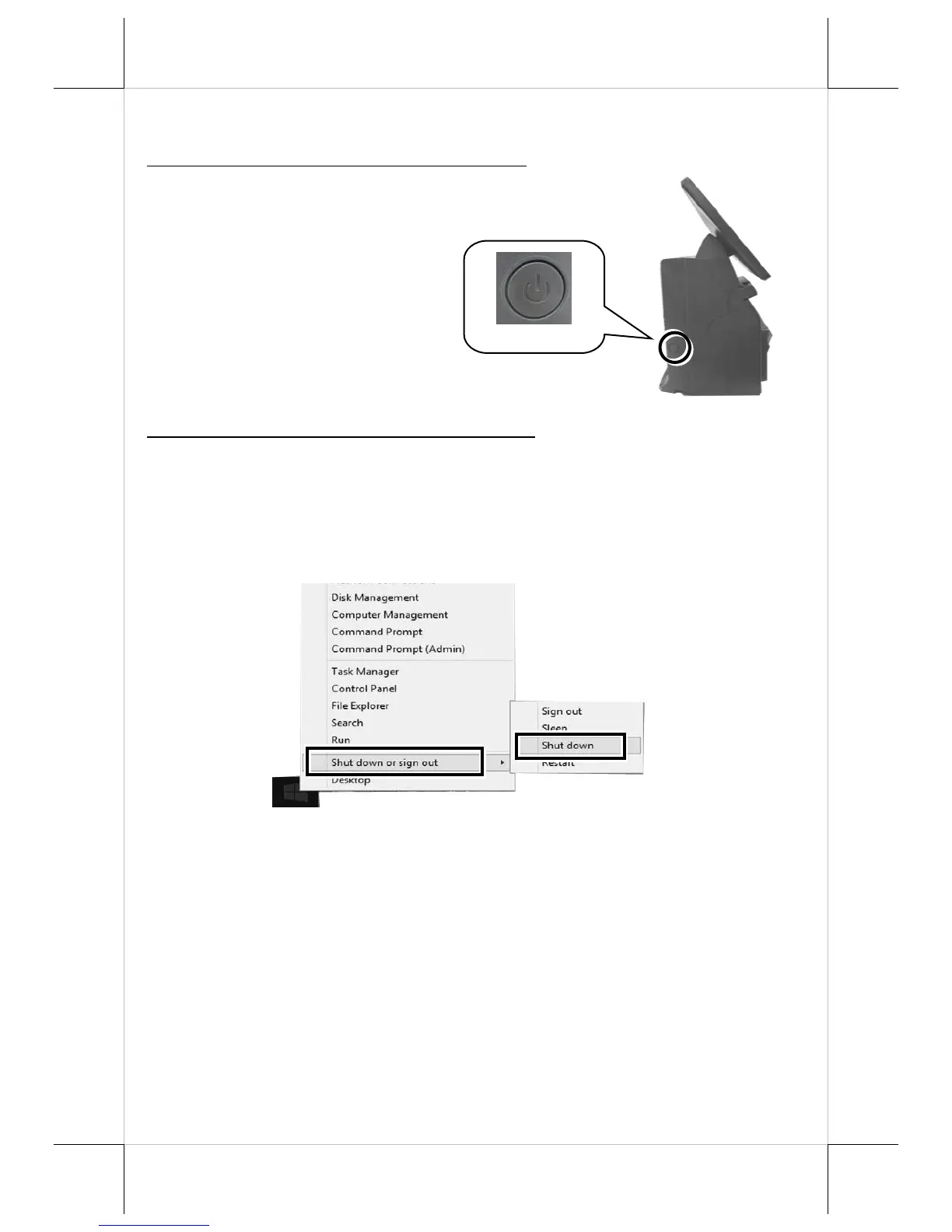
Powering ON/OFF HS-3510W-E/3512W-E/3514W-E
Power ON HS-3510W-E/3512W-E/3514W-E
To power on the POS, gently press and hold down the
power button for at least 1 second till the Power LED
indicator turns solid blue, and then release the button.
Power OFF HS-3510W-E/3512W-E/3514W-E
For HS-3510W-E/3512W-E/3514W-E which is preloaded with Windows OS,
please carefully go through the sequences described below to properly shut
down the system:
1. Right click on Start button on the taskbar.
2. In the pop-up menu, select Shut down or sign out > Shut down to
completely power down the POS system.
However, it is likely that POS terminals cannot restart or shut down normally
due to the unexpected reasons. In such a case, you should initiate a shutdown
by keeping holding down the power button more than 10 seconds.


 To Next Page