Troubleshooting Printer Paper Jams
The following descriptions provide solutions to printer paper jams
which you might encounter while using the printer.
To avoid paper jam, do NOT press the paper roll cover
release lever during printing.
When a paper jam occurs, please open the roll paper
cover, remove any foreign objects or paper jams, set
the roll paper, and then close the roll paper cover
firmly to fix the problem.
Replacing Epson TM-m30 POS Receipt Printer
HS-3510W-E/3512W-E/3514W-E offers a quick solution to help you to
replace Epson TM-m30 POS Receipt printer when there is a need.
Please go through the steps described below to achieve the purpose.
Before proceeding the procedure, please ensure that the terminal is
completely shut down.
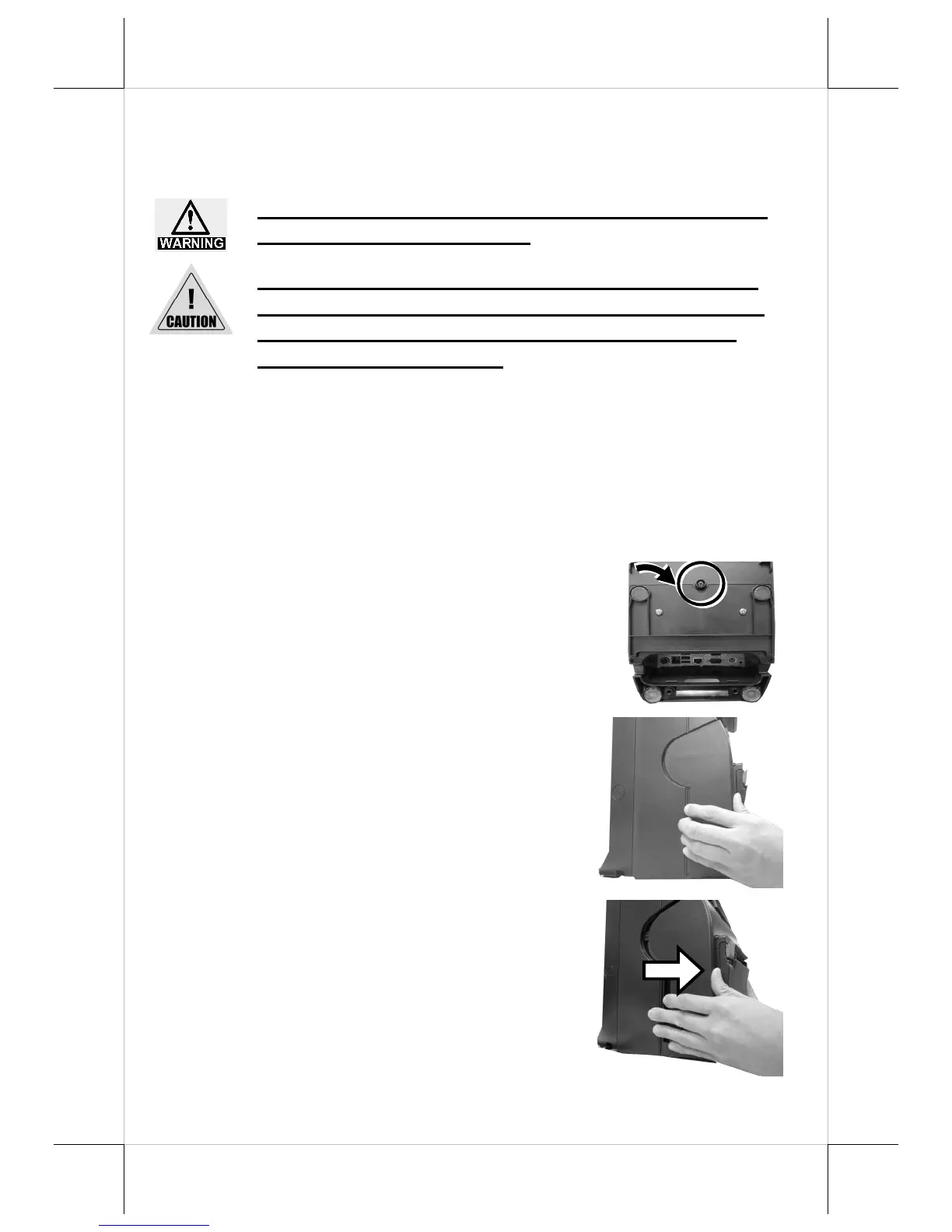
1. After laying POS terminal on a flat
surface with its bottom facing towards
you, remove the screw shown by the
arrow.
2. As shown in the figure, carefully place
your fingernail in the slot between the
front cover of the printer and the rear
case.
3. To separate the printer from the rear case
of HS-series, pull the front cover towards
you with force.


 To Next Page