17
Allows the Gage to visibly and audibly alert the user when
measurements exceed user-specified limits.
When HiLo Alarm is selected, the current Lo setting is displayed.
Adjust down (-) or up (+). Alternatively, measure a coating with a
thickness close to the required value and make final adjustments
with the buttons. Select NEXT to accept this value. The current Hi
setting is now displayed. Follow the same procedure to adjust the
Hi setting.
The icon will appear on the display.
Measurements will be compared to your defined HiLo limits. The
Gage beeps if results are within those limits. A single low tone will
sound if the reading is below the Lo limit, and a high tone if it is
above the Hi limit. Press (+) to clear HiLo readings.
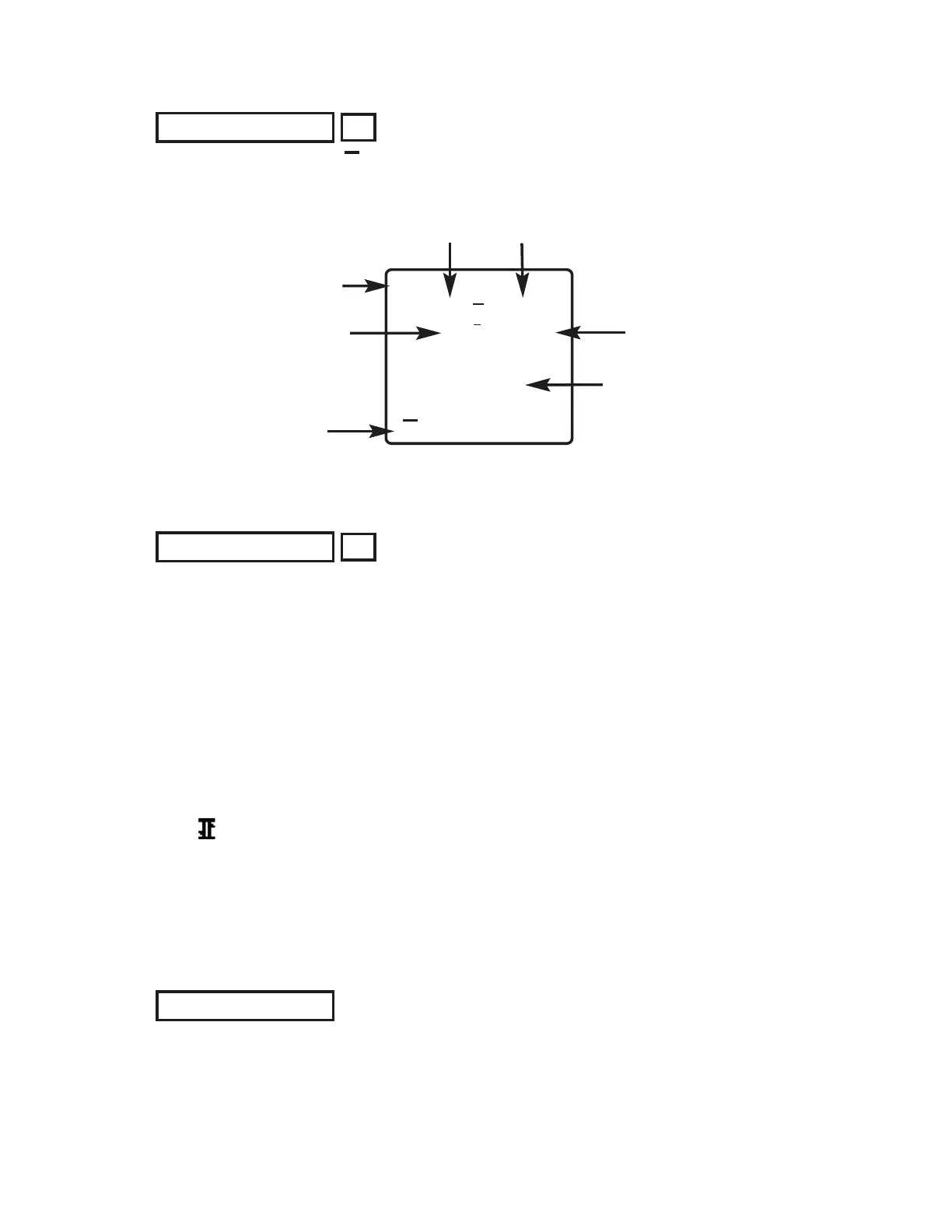
When selected, a icon and statistical summary will appear on
the display.
Remove the last measurement by pressing the (-) button. Press
(+) to clear statistics.
Clear
Statistics Menu
Statistics Menu
Mean
(average)
Standard
Deviation
# of
measurements
Minimum
measurement
Statistics
Icon
Last
reading
Statistics
HiLo Alarm
Clears all on-screen Statistics and HiLo tabulations.
50
microns
n6
49.8
52
48
x
x
x
↨
σ
↨
1.3
Maximum
measurement


 To Next Page