11
One key returning
Notice: While returning, the control lever of the transmitter can not control the drone, wait for the
drone to go back to the take-o point. After indicating the direction of the drone during of
taking o, the control lever can navigate the drone.
Because the following function is based on the APP signal of
the mobile phone, before operating it, make sure that the
mobil phone is connected, or the function won't work.
While ying, press down on the key, the transmitter will
beep, indicating that the following function has been
activated.
Following Function
While ying, press the key for about one second, the transmitter will
beep”, then the drone will start returning to the take-o point. (While
returning, the transmitter will continuously beep).
* Press the key again to stop the return.
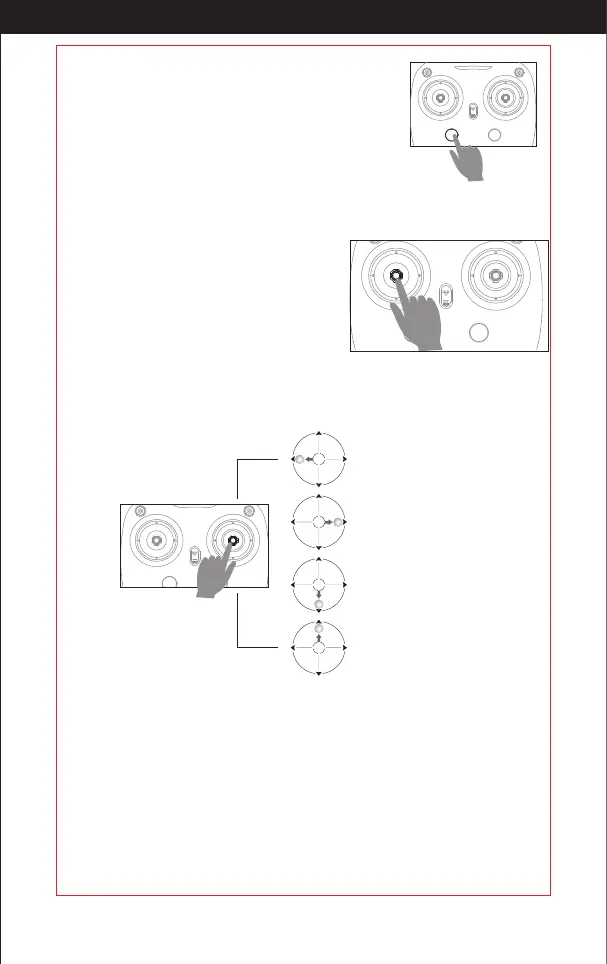
Press down on the right stick, the transmitter will beep, then it will enter the 360 ° function. The drone
will y to a default radius & wait for the user's directions. Adjust the speed and direction of the drone by
manipulating the right stick. There is a minimum radius of the default radius ,the drone ies only in the
sub range.
360 ° Function.
In the state of 360° function, the
left stick could only control the
height of the drone.
Turn left, the drone ies clockwise; If
you move the stick further upwards,
the ying speed will increase.
Pull downwards to enlarge the
circling radius.
Pull upwards to narrow the circling
radius.
Turn right, the drone ies
counterclockwise; If you move the
stick further upwards, the ying speed
will increase.
Press down
Constant Height Mode
Notice: If propeller or motor is damaged, the constant height function will not work. Due to
atmospheric pressure instability or unsuitable weather, the high altitude function will not
work either.
Intelligent hight control can calculate the suspended height,it has more stable control performance
to make the beginner operate it easily. So you do not need to have you hand on the stick to control
the drone, making it easer to focus on your aerial photography.
Press down
Intelligent ight control can calculate the suspended height.
The aim of xed point mode+constant height mode=spot hover , which gives the user more exibility
to take clear photos.
* This section is a GPS location xed-point. So before ying, make sure it is connected to GPS signal
or it will not work.
Fixed Point Mode
http://www.ipotensic.com



 To Next Page