10
While taking photos, press the photo key once to take one
photo. Press the key continuously, and you can take several
photos (While taking photos, clicking the key, will make the
transmitter beep).
While taking videos, press the key 1 second to start recording. The transmitter will beep indicating you
to operate it. If you want to stop it, you can press the button 1 second again.
Photo、Video
Press the key of gimbal adjustment,
the gimbal will move upward and downward, release the key
to stop it when it move to the angel you want.
Gimbal Adjustment
Function Introduction
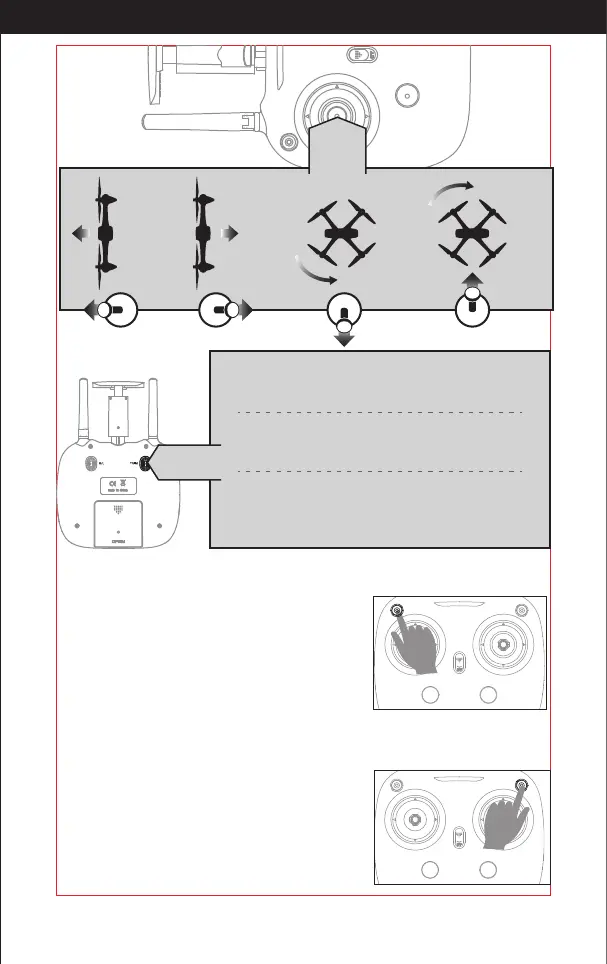
Left
Stick
Adjust the stick to the left,
the drone will rotate left.
Adjust the stick to the right,
the drone will rotate right.
Upward the left stick,
the drone will y up.
Downward the left stick,
the drone will y down.
Left / Right Rotates Trimmer
When you take o, if the drone head rotates to the left, press the
trimmer button, and push left stick to right. Otherwise please
push it to the left.
Forward / Backward Trimmer
When taking o, if the drone tilts forward , press the trimmer button,
and push the right stick backward. Otherwise push it forward.
Left / Right Tilts Trimmer
When taking o, if the drone tilts to the left, press the trimmer button,
and push the right stick to the right. Otherwise push it to the left.
Trimmer
mode
http://www.ipotensic.com



 To Next Page