13
Picture 10
1. Insert the TF card to the slot in accordance with Picture 10. (*TF card
is not included)
2. The photos will be saved in your mobile phone & on the TF card,
while videos can only be saved on the TF card. But you can
download the video to your mobile phone or view it on the phone
when it's connected to the drone's WiFi and the TF card is in the
drone.
Tip: Please play the video or photo after coping all aerial photography data to computer and
make sure the play software can support AVI format.
To take photo and record video
Tip: Click on the video icon to save a video when ending recording, or the video cannot be saved.
3. Power o the drone after you nish taking photos. Take out the TF card and insert it into a card reader.
Connect the card reader with a computer USB port. Then view the aerial photography data from “my
computer” - ” mobile disk” .
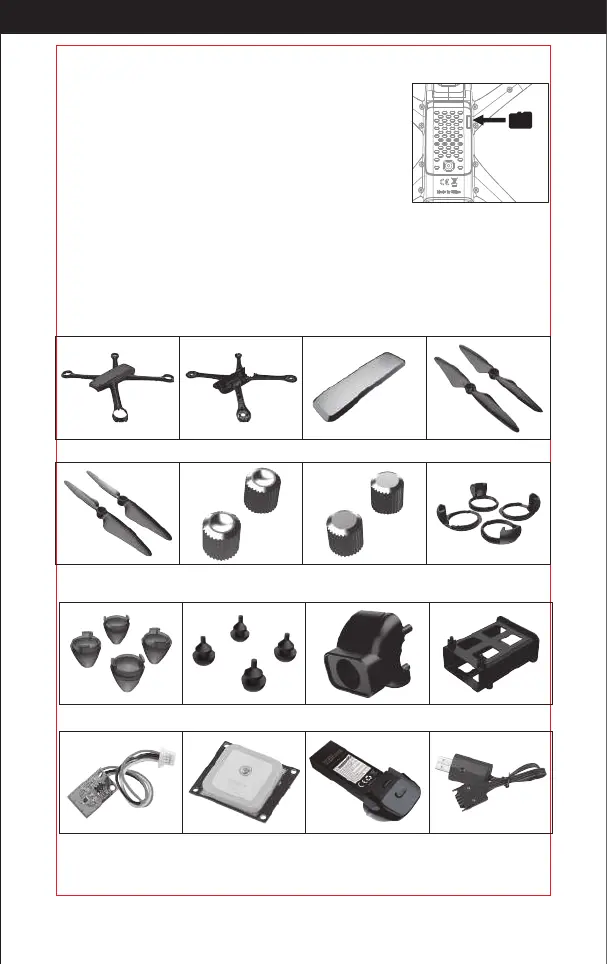
Components
(Sold separately)
Drone upper housing Drone bottom housing Top cover Propeller A
Propeller A
Concave lock cap
Flat lock cap
Lampshade holder
Propeller B
Magnetic plate
GPS module Flight Battery USB Charger
Cushion Camera hood Battery holder
Lampshade
http://www.ipotensic.com



 To Next Page