6
Charging Instruction for Drone Battery
Drone Battery
Parts installation
Drone Battery Li-Po Battery Disposal & Recycling
Wasted Lithium-Polymer batteries must not be placed with household
trash. Please contact local environmental or waste agency or the
supplier of your model or your nearest Li-Po battery recycling center.
Power BankPhone Charger Computer Charging Car Charger
Picture 2
Picture 1
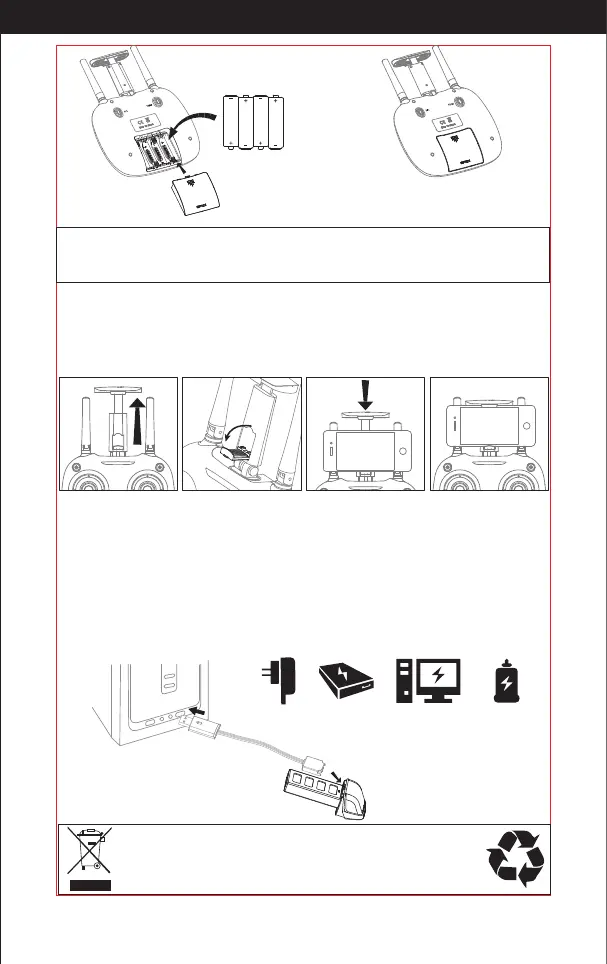
Battery Cover
4*1.5V
Alkaline battery
1.Make sure the electrodes are correct. 3.Do not mix dierent kinds of batteries.
2.Do not mix new with old batteries. 4.Do not charge the non rechargeable battery.
Notice:
Attaching your phone to the transmitter
Notice:Do not pinch the buttons on the mobile.
1. Pull up the phone holder clip on the transmitter (Picture 3). Pull down the little phone ledge
(Picture 4).
2. Place your phone between the clamp and ledge. It will tighten automatically (Picture 5/6)
1. First, Connect the drone battery with USB cable and then choose one of the following methods to
charge.
2. When the USB is charing the light will be red but after it is completely charged it will turn green
* For faster charging, it is recommended to use an adapter with 5V 2A output current (not
included) to charge the battery.
Picture 3 Picture 4 Picture 5 Picture 6
http://www.ipotensic.com



 To Next Page