5
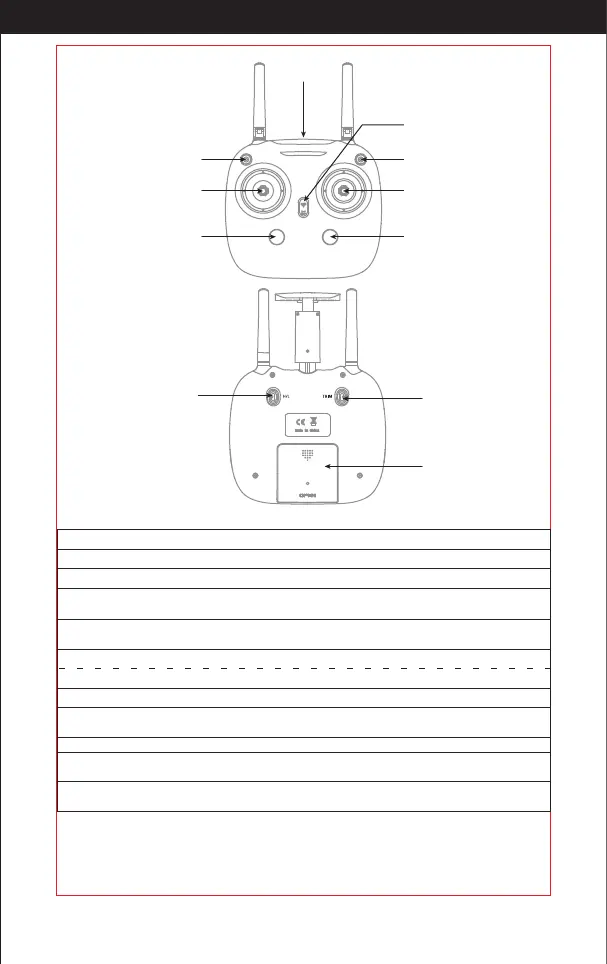
Transmitter
Power switch
Left stick
(press down to follow)
One key taking o /
One key landing
One key returning home
Right stick
(press down to surround)
Photo/video Gimbal adjustment
Phone Holder
Trimmer Mode Button
Battery Cover
High/middle/ low speed
Gimbal Gear Adjustment Key:
Press down the key to adjust the camera angle up and down.
Press the right rod to activate the 360° Function, which allows your drone to circle
around your desired point of interest.
Click H/L button to change your speed from High, Medium. or Low.
Photo:
Click the camera button to take a photo. If you click it continuously, it will take several photos.
Video: Click the video button to record. Click again to nish recording.
Key Function
Left control rod: To control the drone up/down/Rotate left /Rotate right
Right control rod:
To control the drone forward/backward/Move left/Move right
Slide up the power switch to turn on the transmitter
Power switch:
Return Button:
One key taking o /
one key landing:
To begin ying, click the take o button to start the drone; To land press
the same button again.
Under GPS mode, Press the return button for a second & the drone will y
back. Press again, the drone will hover until you are ready to control it.
360° Function:
Follow Function:
Press the left rod to activate the follow function. Press again to stop.
High / middle /
low speed mode:
Trim Button:
Hold down the trim button while controlling the rod dials to slowly move
in the direction you want. Release the button to stop.
The installation method of battery
Open the battery cover on the back of the transmitter. According to the electrode
instructions of the battery box, put in 4 AA5 alkaline batteries (battery needs to be
purchased separately) .Close the battery cover(Picture 2).
http://www.ipotensic.com



 To Next Page