8
Insert the battery into the drone, then turn on the drone. The light on the drone will be solid for 2
seconds and then ash quickly. That means the frequency is successfully. the indicator light on the
left is ashing & there is no light on the right, it comes to level correction.
Compass calibration
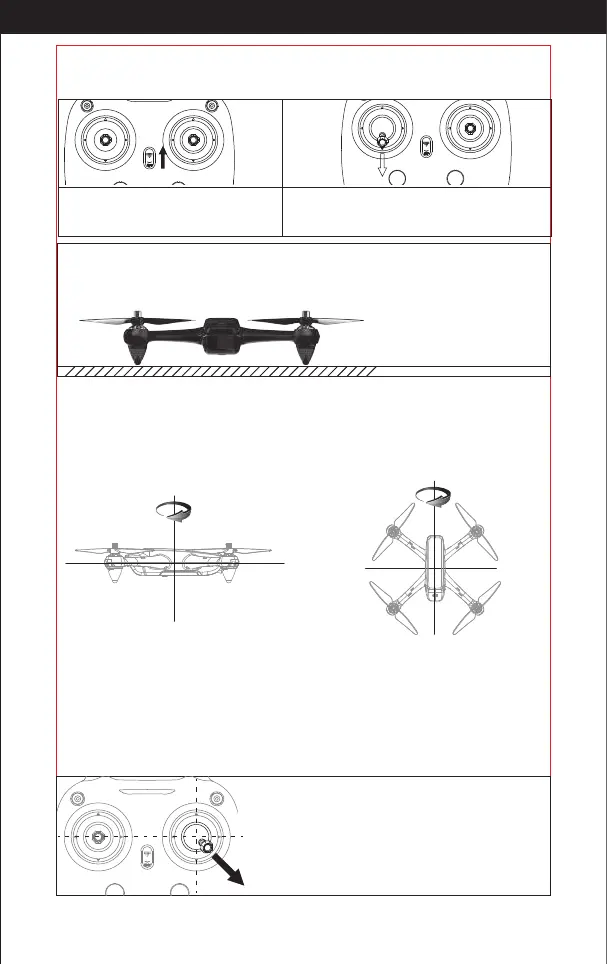
Level Correction: Rotate the drone horizontally(Picture 8), the transmitter makes a beeping sound & the
left light of the drone turns bright, it means that it has successfully calibrated and comes to vertical
correction.
Vertical correction: Rotate the drone vertically (Picture 9), the right indicator lights will turn on. When
the transmitter makes the long beeping sound, the drones lights will begin its rotating ash, indicating
that it has nished calibration.
Picture 8
Level Correction
Picture 9
Vertical correction
Tips: It has to do the the compass calibration each time you start the drone, or it can't work
normally.
GPS Signal search
After successfully calibrating the frequency, the drone will automatically search for the GPS signal.
The blue light on the left of the transmitter is the GPS connection indicator, if it keeps long bright, that
means the connection to GPS. The drone can't work without GPS connection.
Calibration (This action is used when ying abnormally)
After making right frequency, please push the right stick
lever of the transmitter to the lower right angle of 45
degrees, please release it when the drone fuselage ash
quickly, it means you’ve nished compass calibration,
now the drone can y normally.
It must be placed on a at surface!
Flying steps
Syncing Frequencies
Turn on the power.
Push the left transmitter stick completely downwards.
Then the light will ash slowly. This means that the
transmitter is ready to sync.
http://www.ipotensic.com



 To Next Page