- 10 -
Potensic Toy APP
Connecting with Smart Phone
Wisp can also directly control the aircraft through the mobile phone. Please note
that the remote control distance is 50m(under no interference environment).
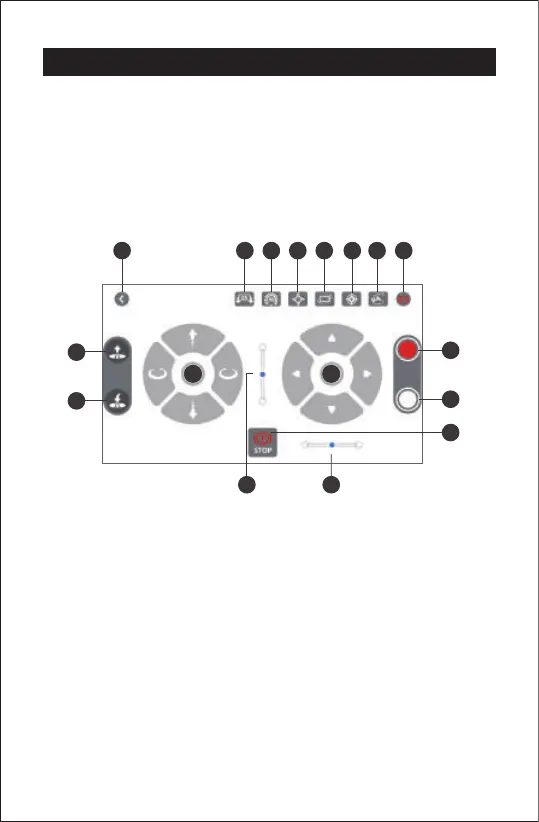
Operation Interface
1. Turn on the drone, then enter the mobile phone “setting-WiFi” and connect
"Potensic P7_xxxxxx", no passward is needed.
2. Start the mobile phone APP "Potensic Toy" to enter the operation interface.
1
3
8
4 5 6
11
7
9
10
13
15
12
1716
14
2
1. Left virtual stick
2. Right virtual stick
3. Virtual stick switch
4. Speed adjust(30%,60%,100%)
5. Headless mode
6. Gravity sensor
7. One button calibration
8. Path flight
9. Battery power display
10. Main interface
11. One key take off
12. One key landing
13. Take a video
14. Take a picture
15. Emergency stop
16. Forward and backward fine tuning
17. Left and right side flight fine tuning
Phone Control
The aircraft can be directly controlled by a mobile phone, please note that the flight
control distance is 30m (in a non-interference environment)
Steps:
1. Power on the aircraft
2. Open the APP after connecting to WiFi
3. Turn on the virtual joystick and press the "one-key take off" icon to control the flight.



 To Next Page