9
WARRANTY
CENTER
C
E
R
T
I
F
I
E
D
SECTION 1.6 – Electronics & Controllers
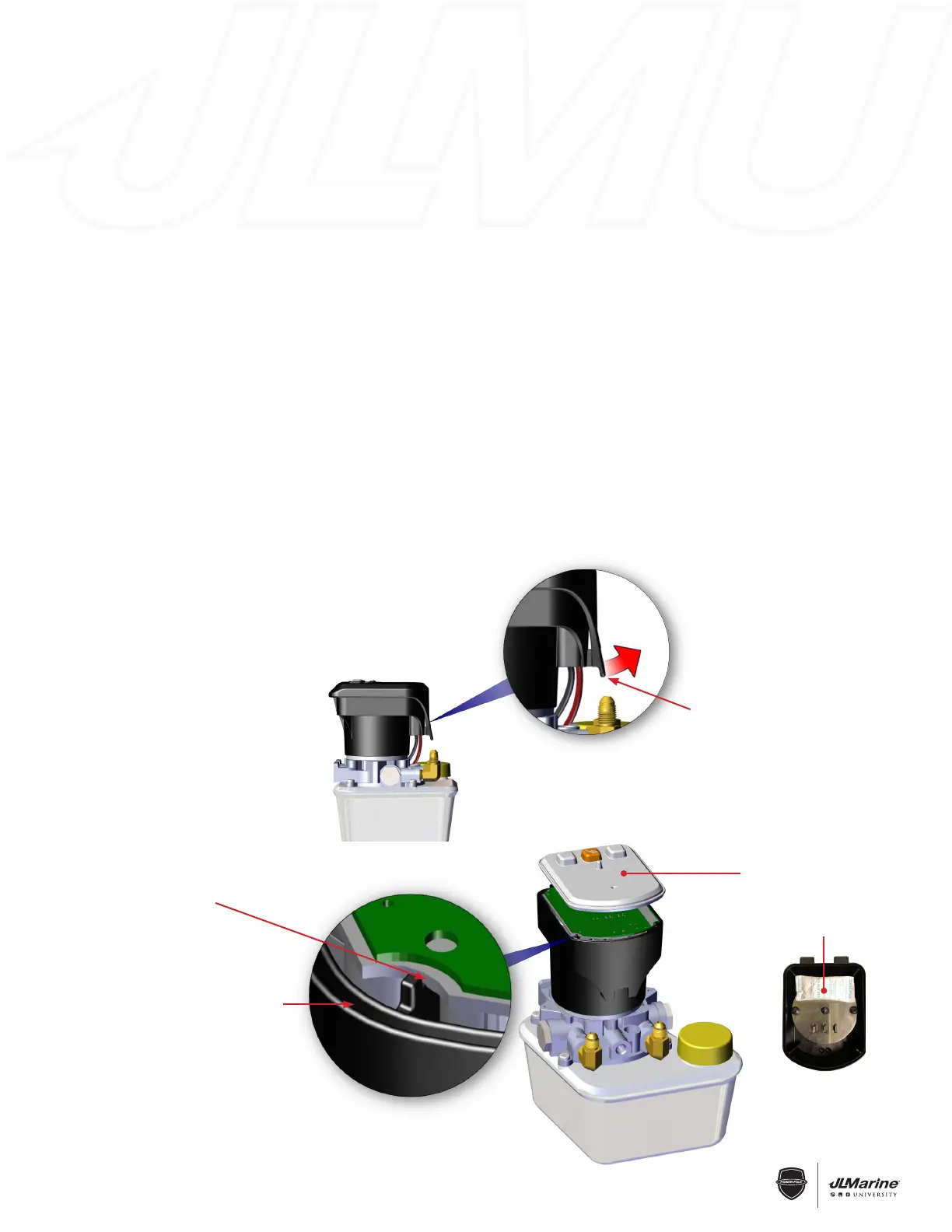
Figure 1
Figure 2
Circuit board fully seated
and flush with motor
casing at all four corners
Motor casing groove for
circuit board membrane
Circuit board membrane
Pump Cap Tab
Desi-Pak
Figure 2-a
C-Monster 2.0 Circuit Board Installation
REMOVAL:
STEP 1 Disconnect the RED 12V (+) wire from the battery source, or remove the 40 Amp inline fuse.
STEP 2 Remove the Pump Cap by pulling on the Tab and lifting up on the Cap. FIG 1
STEP 3 Remove the Circuit Board Membrane. FIG 2
STEP 4 Pry the front of the Circuit Board up using the Pump Cap and remove it. FIG 3 (next pg.)
IMPORTANT! Be careful not to touch the Antenna as this could damage it. FIG 4 (next pg.)
INSTALLATION:
STEP 1 Install the Circuit Board into the Motor Assembly so that it is flush with the top of Motor Assembly.
FIG 2
IMPORTANT! Make sure the DESI PAK is on the top of motor assembly before installing the new Circuit Board.
FIG 2-a
STEP 2 Install the Circuit Board Membrane so the edge is seated completely in Motor Casing Groove.
FIG 2
STEP 3 Make sure the Power Cord is fully plugged into the Pump and reinstall the Pump Cap.
STEP 4 Reconnect the RED 12V (+) wire to the battery source and make sure the 40 Amp inline fuse is installed.
NOTE: If the buttons stick and cause the Power-Pole to auto run remove the cap and reinstall circuit board
membrane.


 To Next Page
 Loading...