6
WARRANTY
CENTER
C
E
R
T
I
F
I
E
D
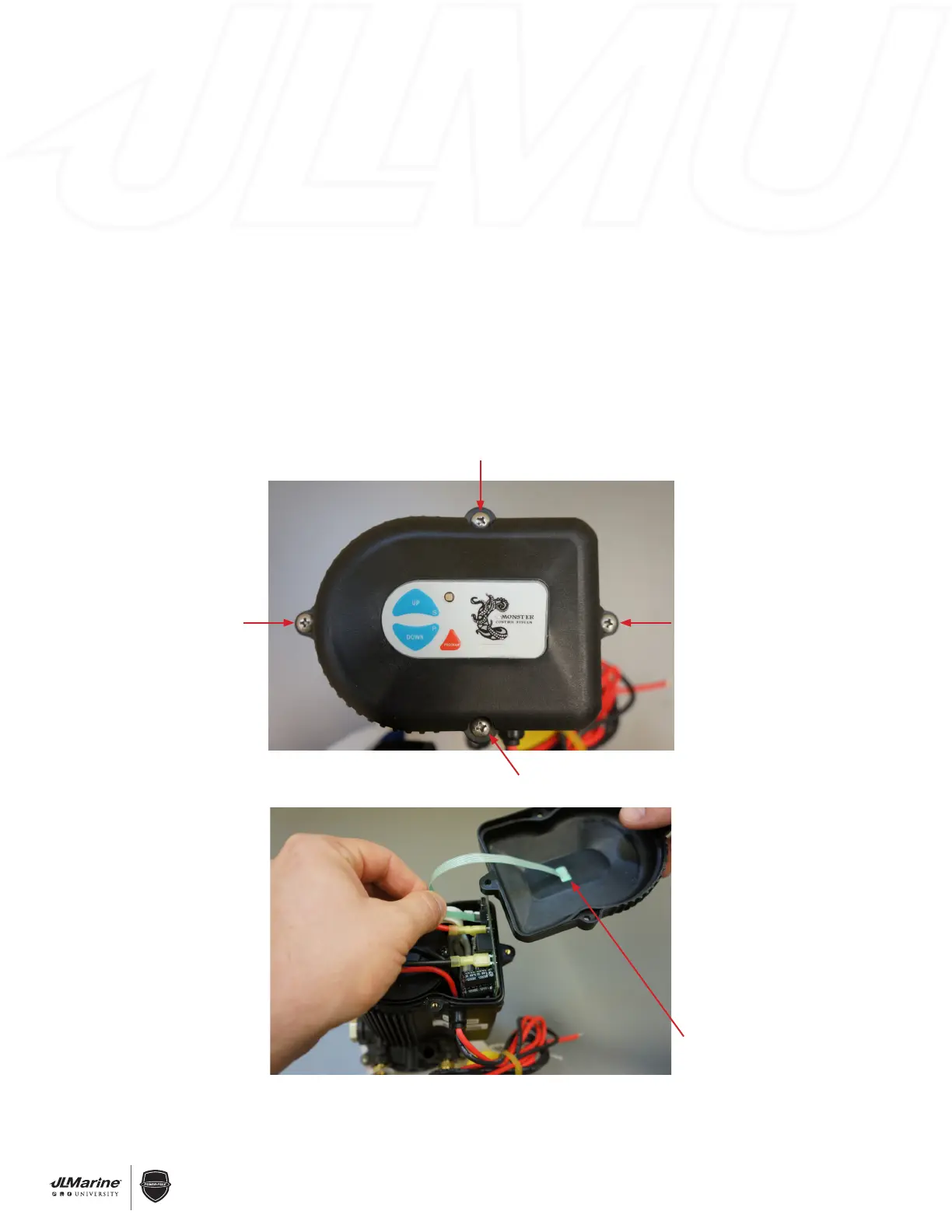
Figure 1
Figure 2
Membrane Switch
Ribbon Wire
SECTION 1.3 – Electronics & Controllers
C-Monster 1.0 Motor Cover Installation
REMOVAL:
STEP 1 Disconnect the RED 12V (+) wire from the battery source, or remove the inline fuse.
STEP 2 Remove the four Phillips Head Bolts that hold the cover on the C-Monster Motor Assembly.
FIG 1
STEP 3 With the cover removed, disconnect the Membrane Switch Ribbon Wire from the Circuit Board by
gently pulling on it. FIG 2
INSTALLATION:
STEP 1 Follow REMOVAL STEPS 2 & 3 in reverse order.
STEP 2 Re-install the cover with the four Phillips Head Bolts.
STEP 3 Re-connect the RED 12V (+) wire to the battery source, or re-install the inline fuse.


 To Next Page
 Loading...