8
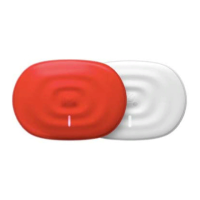
Power/Stimulation Indicator (1):
Can be either WHITE (when the PowerDot is on or on standby mode) or ORANGE (when it’s being used for
stimulation).
Multifunction Button (2) Modes:
Multifunction Button carries out these PowerDot functions:
Multi-function Button
Action
PowerDot Initial State PowerDot Resulting State
Hold for ~1 second PowerDot is OFF (no lights) PowerDot is now ON (white light
is on)
Hold for ~1 second PowerDot is ON (white light is
on)
PowerDot is now OFF (no lights)
Quick Click PowerDot is in Stimulation
(orange light is on)
Stimulation stops (orange light is
ON )
Hold for 5 seconds Device is ON Full Factory Reset: activation lock
is released, , Power LED turns
OFF, after few seconds turns ON
again, blinks several times and the
PowerDot becomes OFF
Hold for 3 seconds Device is OFF Soft Reset: Activation lock is
released, Power LED blinks
several times
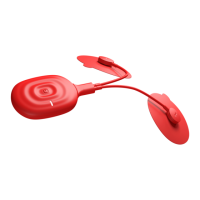
Micro-USB Connector (3):
PowerDot uses the same high voltage micro-USB connector (3) for lead cable connection and for charging.
If the device is being used for stimulation, it will immediately stop once the lead cables are disconnected
from the micro-USB connector.
Charging Indicator (4):
While the device is still charging, you will see the ORANGE Charging Indicator (4) next to the micro-USB
charging connector. Refer to the Recharging PowerDot section below for more information on PowerDot
charging.
Snap Connector (5):
Used to attach and hold the PowerDot device in place on the rectangular pad.
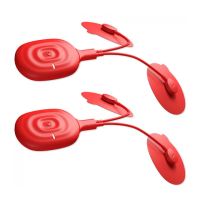
Lead Cable (6):
For an easier, more comfortable PowerDot stimulation, two lead cables of different lengths (10 cm and 30 cm)
(6) are provided with each PowerDot. These give you the option to choose the right cable to reach the muscle
group you’re targeting, depending on your physical measurements.


 To Next Page