Scroll Medical & Laboratory Compressed Air Systems
Powerex • 150 Producon Drive • Harrison, OH 45030 • USA
P 1.888.769.7979 • F 513.367.3125 • www.powerexinc.com
IN907800AV • 08/2018
Page 22 of 40
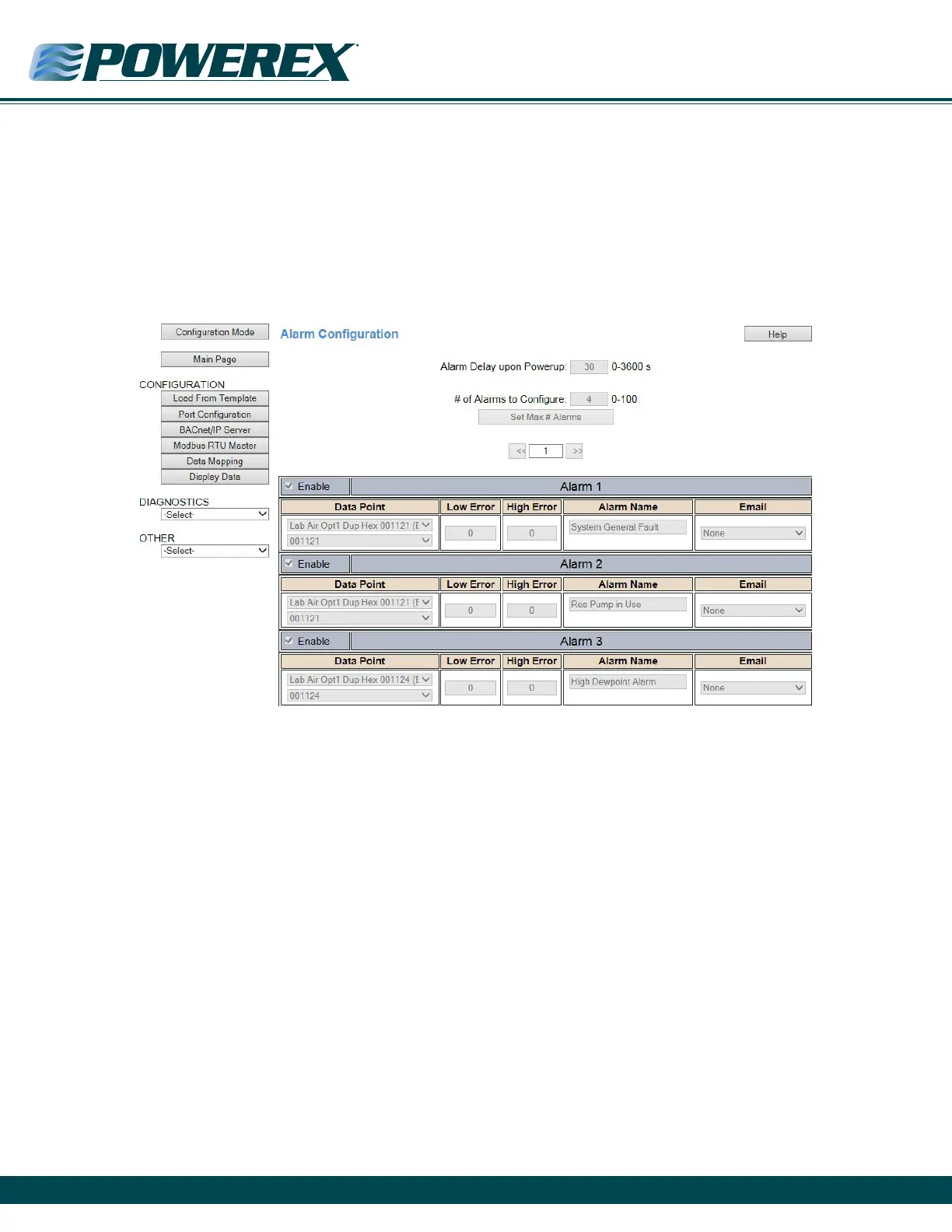
Alarm Conguraon
1. Click on the Other dropdown menu and select Alarm Conguraon. Click on the Conguraon Mode buon to edit the alarm sengs.
2. To enable an alarm, check the enable box.
3. If an alarm is enabled, then the Low Alarm and High Alarm must be set.
4. If the value of the point falls below the Low Alarm, the alarm is set and an email is generated if email is congured.
5. If the value of the point reaches the High Alarm, the alarm is set and an email is generated if email is congured.
6. Scroll to the boom and Save Parameters.
7. To save changes and force the gateway back to running mode, click on the Reboot Now buon and aer 5 seconds hit the Refresh buon.
You should see the gateway appear in Mode: Running.



 To Next Page