6.8 Fuel Pre-filter, Change
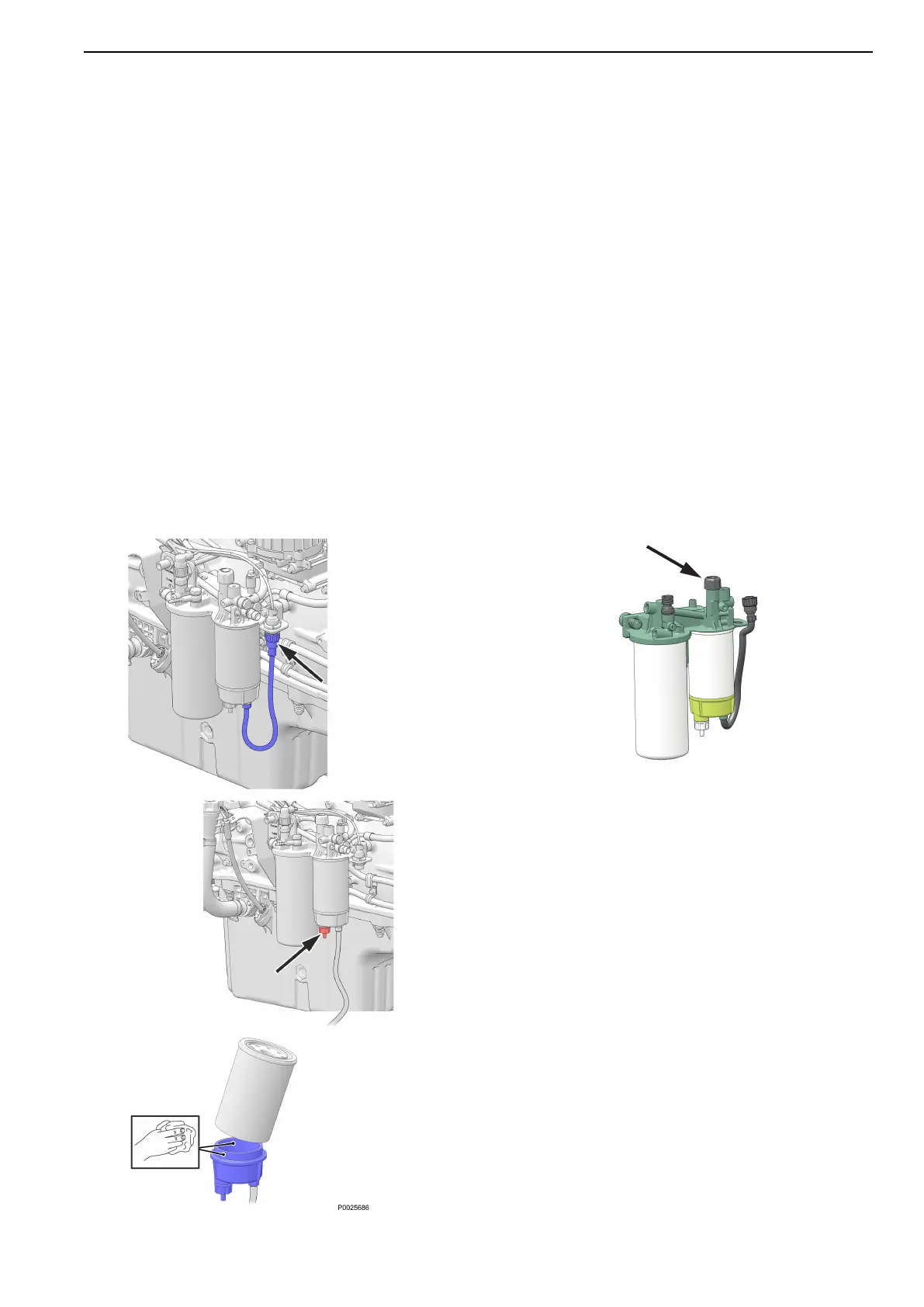
1 Undo the cable from the water trap sensor.
2 Remove the water trap filter from the filter
housing.
Collect any spilled fuel in a container.
3 Remove the lower part of the water trap from
the filter.
4 Clean the lower part of the water trap with a soft
rag.Check that the drain hole in the lower part is
not blocked.
5 Install a new seal on the lower part and
lubricate the seal with diesel fuel. Re-install the
lower part of the filter.
6 Lubricate the seal with diesel fuel. Screw the
filter onto the filter bracket by hand until the rubber
seal just touches the mating surface. Then tighten
a further half turn, no more.
7 Connect the cable to the water trap sensor.
Fuel system, bleeding
1 Check that there is sufficient fuel in the tank,
and that any fuel taps are open.
2 Release the hand pump on the fuel bracket
by pushing down and twisting the plastic handle.
3 Vent the fuel system by pumping with the
hand pump.Air is vented to the tank via the fuel
return pipe. No breathing nipples need be
opened.
4 Lock the hand pump, push down and twist the
handle.
5 Start the engine and allow it to idle fast for
about 10 minutes.
6 Perform a leakage and function check.
CHAPTER 6 — MAINTENANCE
43


 To Next Page