POWX1195 EN
Copyright © 2016 VARO NV P a g e | 7 www.varo.com
8 OPERATION
8.1 Switching ON/OFF
Switching on: Press the operating switch (8).
Switching off: Release the operating switch(8)
8.2 Handle attachment (Fig. 2)
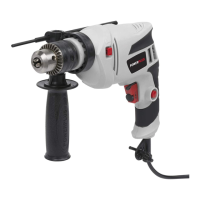
For reasons of safety, only use the hammer drill with handle attachment.
You will be able to obtain a safe body position when working by rotating the handle attachment.
Loosen and turn the handle attachment in an ant-clockwise direction. Slip loop onto the neck
of the housing tool and position the handle, then tighten the handle attachment.
8.3 Dust collection device (Fig. 3)
Before carrying out hammer-drilling work vertically overhead pull dust collecting device over
the drill bit.
8.4 Hammer / drill switch
The hammer/drill switch can switch the drill, hammer and hammer/ drill functions.
To set the function, please use below compounding of front and rear hammer/drill switch.
Important! When hammer drilling you will require a low pressure. Too much
pressure will place unnecessary load on the motor. Check the drill bits
regularly. Re-sharpen or replace blunt drill bits.
Do not use the chuck with SDS connector in combination with the
hammer/hammer drill function!
Hammer/ drill mode:
Drill in masonry, concrete and natural stone.
Don’t use the hammer drill function for ceramic
tile or others material can not withstand impact
energy.
Hammer mode:
Drill in masonry, concrete and natural stone.
Drilling mode:
Drilling in wood, synthetic materials and metal.
WARNING! No function mode:
The motor turns without load,
the shaft will not turn. Do not
set the switch like this. It may
damage the motor greatly.



 To Next Page