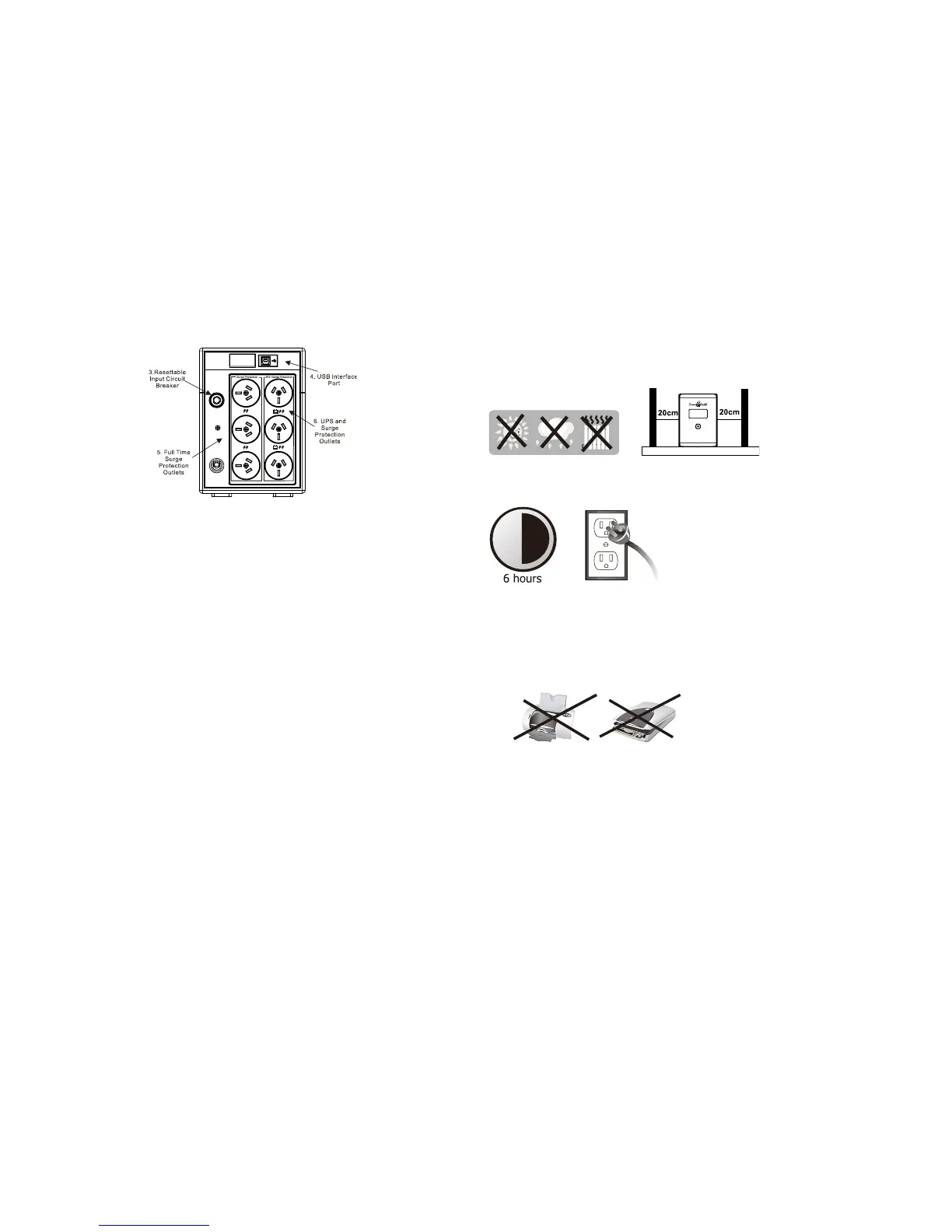
Rear View :
1. User Friendly LCD Display
See 6. “Understanding Display section for detail .”
2. On/Off Switch
Turn on and off unit with and without utility.
3. Resettable input circuit breaker
Breaker will trip when there is overload / short occurs at output of the unit.
Circuit breaker is rated at 10Amp.
4. USB interface port
Connect USB cable and computer. Install NetGuard UPS monitoring software
for advanced power monitoring.
5. Full time Surge protection outlets
These outlets do not provide battery backup when mains has failed. The
outlets provide continuous protection for surges and spikes. Connect
peripherals that do NOT need battery backup.
UPS and Surge Protection outlets
These outlets provide battery backup power when main fails and unit is
turned on.
Connect peripherals that need battery backup protection. Do not connect
Laser printers.
5. Installation & Start up
Install the unit in the controlled environment area that is free from dust and has
adequate air.
Plug the AC input cord into the wall outlet and the unit will automatically start
charging the battery. Please allow 6 hours to recharge the battery.
NEVER Connect a laser printer / scanner to the UPS outlets. This may cause
damage to the unit. The, following types equipment may cause some problems since
battery output of this UPS is not sinusoidal.
Inverter, Transformer, AC line filters and some PFC power supplies.



 To Next Page