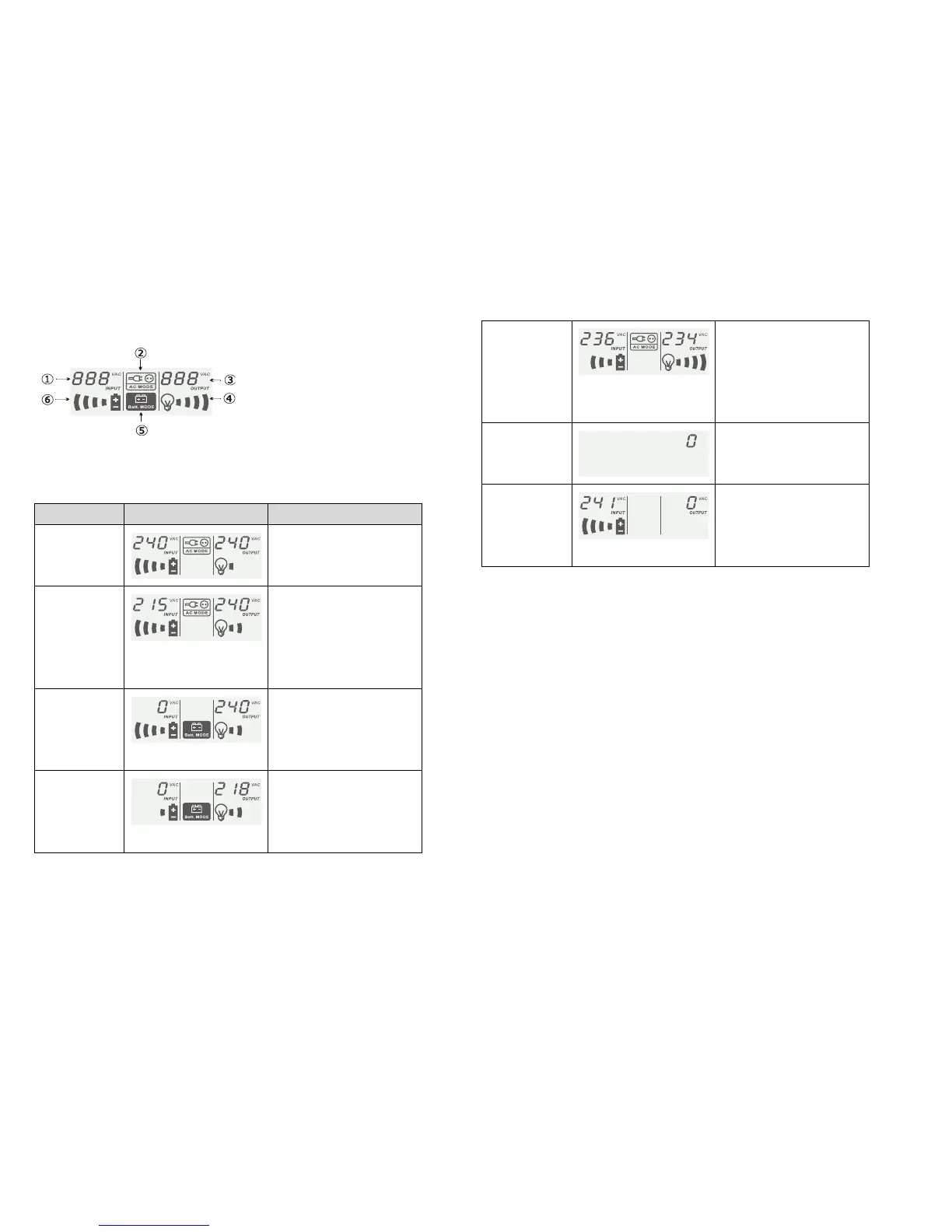
6. Understanding LCD display
① Input Voltage meter ②On line mode Icon
○
3
Output voltage meter ④Load level indicator
○
5
On battery mode Icon ⑥Battery level indicator
Utility is stable and the unit is
supplying its power from utility.
No beep
The unit is boosting / bucking input
voltage.
On line mode icon flashes every 1
sec.
No Beep
There is a power disturbances /
black out. The unit is supplying
power from battery.
Beeps 2 beeps every 30 sec
Battery capacity becomes low. The
unit will shut its output down.
On battery mode icon flashes.
Rapid beep one sec interval
Total output power has exceeded
the maximum power rating of the
unit.
Load level indicator flashes.
Constant Beeping
Please call for assistance when this
indicator appears.
On/Off button does not turn on. The
unit is connected to utility. Battery
are being recharged.
No Beep.
7. Software Installation
1. Insert NetGuard CD into CD-ROM drive and follow the on screen instruction.
If Auto start does not run, then please run “ setup.exe” for the installation.
2. When the installation completed, NetGuard agent icon will appear on Task
bar.
3. Once the installation is completed click plug icon found on the task bar and
start the program.



 To Next Page