5
CHARGING INSTRUCTIONS
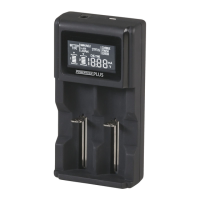
1. Connect the unit to a 5V DC 2A USB adaptor with the supplied Micro-
USB cable or connect to a DC adaptor with 12V DC 1A. The LCD lights up
automatically once the unit has been powered on.
2. Insert a rechargeable Ni-MH / Ni-Cd / Li-ion / LiFePo4 battery into the
charging slots. Make sure the contact for polarity (+ / - ) is matching to
the signs in the charging slots. Reverse polarity or incorrectly inserting the
batteries will result in charging failure, the “Error” icon will be shown on the
LCD display and capacity gauge for the corresponding slot will flash rapidly.
(See more in Reverse / Bad Cell / Short Circuit)
3. When charging begins, the “CHARGE” icon will be shown and the charging
information will be shown corresponding to the slot with icon (
) on the
top of the charging indicator. Press the SLOT button to switch the display
information to the next charging slot. Charging current is switchable for Li-
ion / LiFePo4 to achieve faster charging by pressing the MODE button. (See
more in SLOT / MODE)
4. When charging is completed, the “Finish” icon will be shown and (
) will be
shown on the LCD display.


 To Next Page