Xcelerators Owner’s Manual
14
CALIBRATION
Calibrations can be modied after selecting power level when installing a tune.
Modify speed limiter, adjust tire size, adjust axle ratio, and remove security.
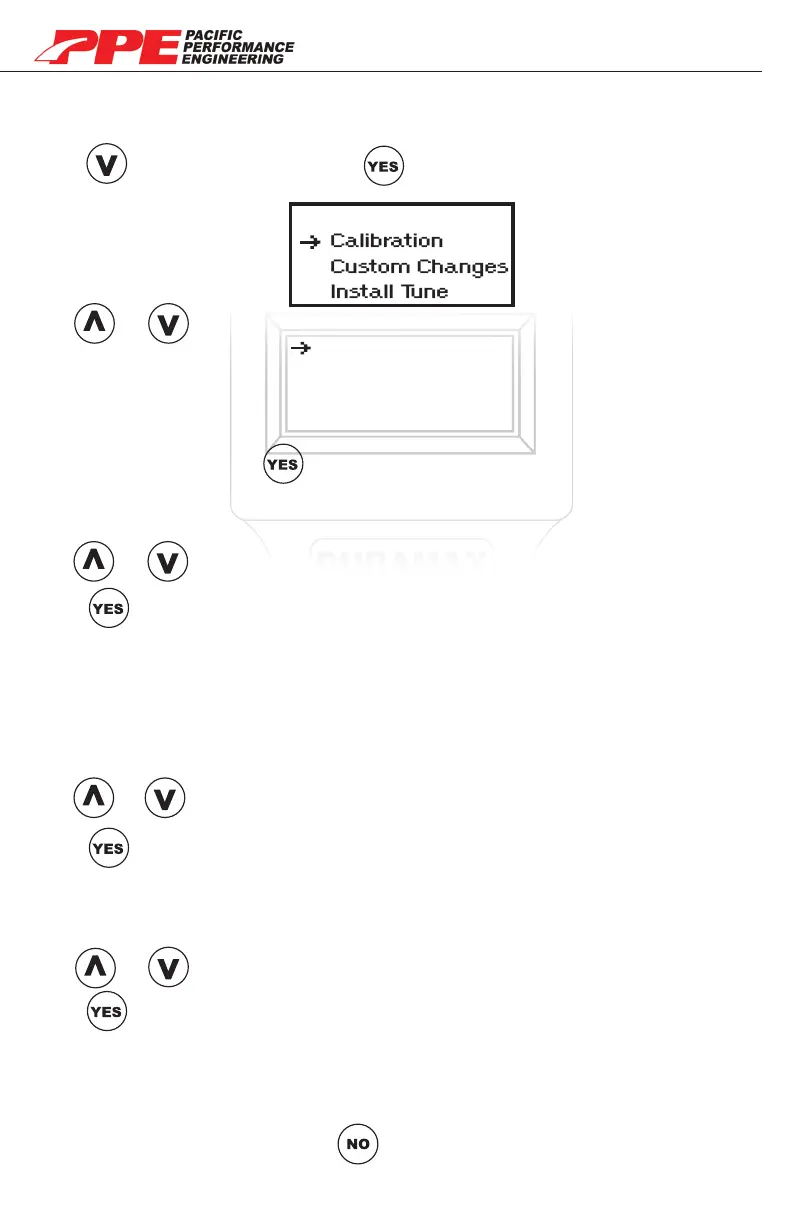
Press go to “Calibration”. Press to see calibration menu options.
Select Tune
Calibration
Custom Changes
Install Tune
Speed Limiter
Adj Tire Size
Adj Axel Ratio
Remove Security
Use or to browse through calibration options.
Choose option and press to change.
SPEED LIMITER
Adjust your vehicle’s speed limiter from 40mph to 200mph in 1mph increments
.
Use or to increase/decrease speed limiter.
Press once desired limit is set.
(Note: Pressing YES will take you back to calibration menu)
ADJUST TIRE SIZE
This option lets you adjust for tires ranging from 25” to 44.75”. If a tire size is
selected over 35” an ABS / break light will be triggered, requiring a custom ABS
calibrtation via GM TECH2 scanner for: 2001 - 2007 LB7, LLY, LBZ only. The
LMM is not compatiable with tire size of 35” to 44.75”. Call PPE for details.
Use or to increase/decrease tire size.
Press once desired size is set.
(Note: Pressing YES will take you back to calibration menu)
ADJUST AXEL RATIO
Adjust your vehicle’s gear ratio from 2.73 to 5.13 (ie. 2500 HD gear ratio is 3.73)
Use or to increase/decrease tire size.
Press once desired size is set.
(Note: Pressing YES will take you back to calibration menu)
REMOVE SECURITY
Remove security is used for applications where OEM steering column and key
security system is not used. (ie. engine swaps into custom vehicles/marine)
After all calibrations are set press to go back to “Select Tune” menu.


 To Next Page