18 5725V101-IN
----
F.SET
REL1
REL2
3
1 2
SETP
-1999
9999
3
1 2
0000
9999
1 2
3
IN
1 2
PASS
XV
TXT 18
TXT 19/20
0.0
100.0
3
1 2
100.0
LANG
TXT 0 . . . 7
3
CZ
ES
IT
SE
FR
DE
DK
UK
3
1 2
1 2
3
TXT 21
TXT 22. . . 2 9
XmA
TACH
S0
NAMU
TTL
NPN
PNP
-0.05
6.45
1 2
TR.LO
TXT 31
3
0.00
6.50
1 2
TR.HI
TXT 33
HI.Z
PL.UP
PL.DN
1 2
Z.IN
TXT 34 . . . 3 6
3 3
5.0
17.0
1 2
S.SUP
TXT 37
3
3
0.0
9.8
1 2
TR.LO
TXT 31
0.02
10.0
1 2
TR.HI
TXT 33
3 3
3
3
3
3
3
3
3
PERC
DISP
1 2
3
REL.U
TXT 52/53
SKIP
1 2
3
REL.1
TXT 5 4 . . . 5 3
TXT 6 7 . . . 6 9
SET
OFF
3
3
0.0
100.0
1 2
3
SETP
TXT 57
if REL.U
= PERC
if REL.U
= DISP
-1999
9999
1 2
3
SETP
TXT 57
INCR
DECR
1 2
3
ACT1
TXT 58/59
INCR
DECR
1 2
3
ACT1
TXT 58/59
0.1
100.0
1 2
3
HYS1
TXT 60
1
9999
1 2
3
HYS1
TXT 60
if REL.U
= PERC
if REL.U
= DISP
1 2
ERR1
TXT 61...64
HOLD
ACTI
DEAC
NONE
3
*2
*2 *3
*1
*7
*6
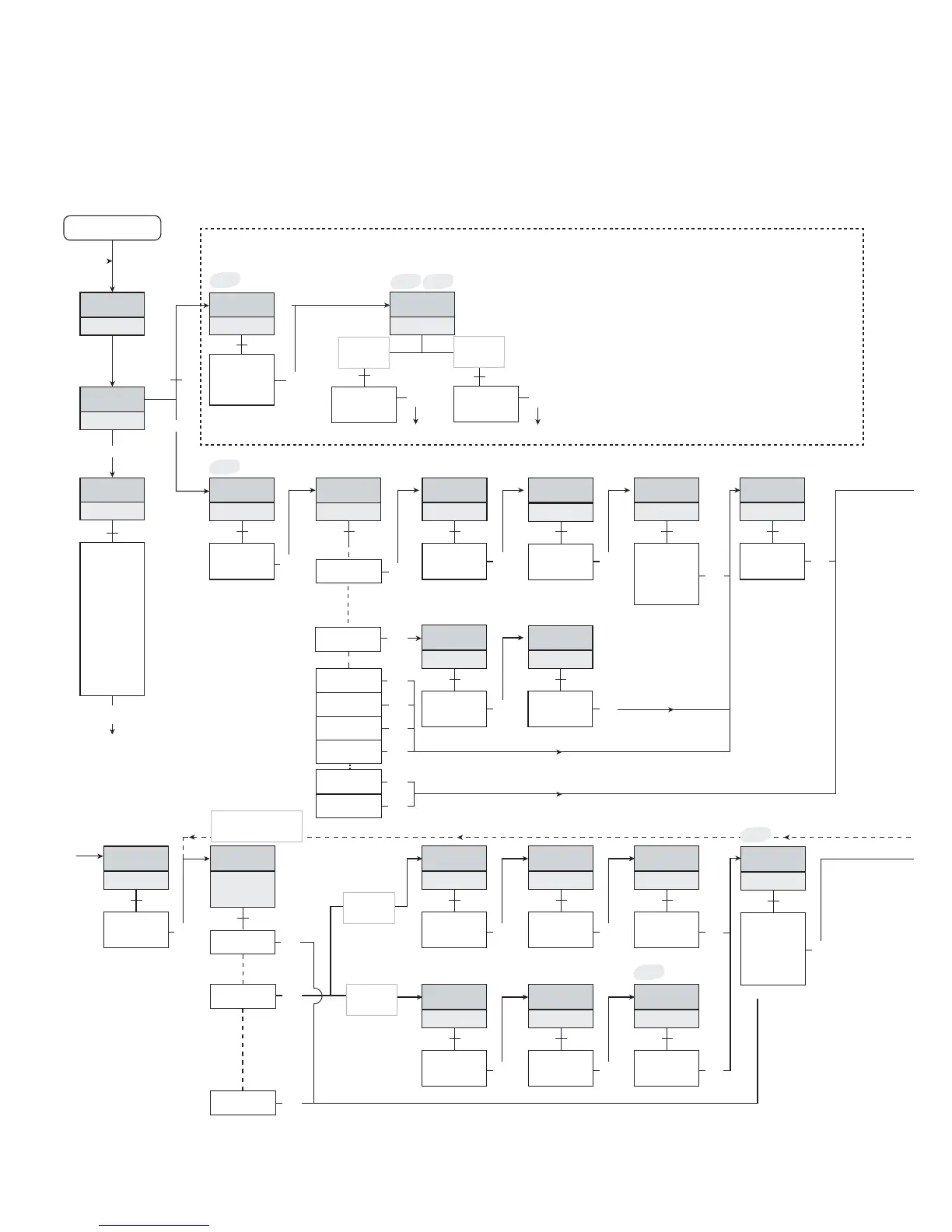
Fast setpoint adjustment and relay test
1 Increase setpoint
2 Decrease setpoint
3 Save and exit the menu
1 and 2 simultaneously =
relay changes state
Same procedure
for REL2!
”Start”
”Monitor”
Hold
(∼3sec.)
Power up
”Start”
”Start”
”Start”
ROUTING DIAGRAM FOR 5725D
If no key is activated for 2 minutes, the display returns to default state ”Monitor”
without saving configuration changes.
1 Increase value / choose next parameter
2 Decrease value / choose previous parameter
3 Accept the chosen parameter and go to the next menu
Hold 3 Back to previous menu / return to default state ”Monitor” without saving.



 To Next Page