When the first user is added to the controller, the default Auxiliary Code will
automatically be deleted, ready for a new Auxiliary Code to be re-entered.
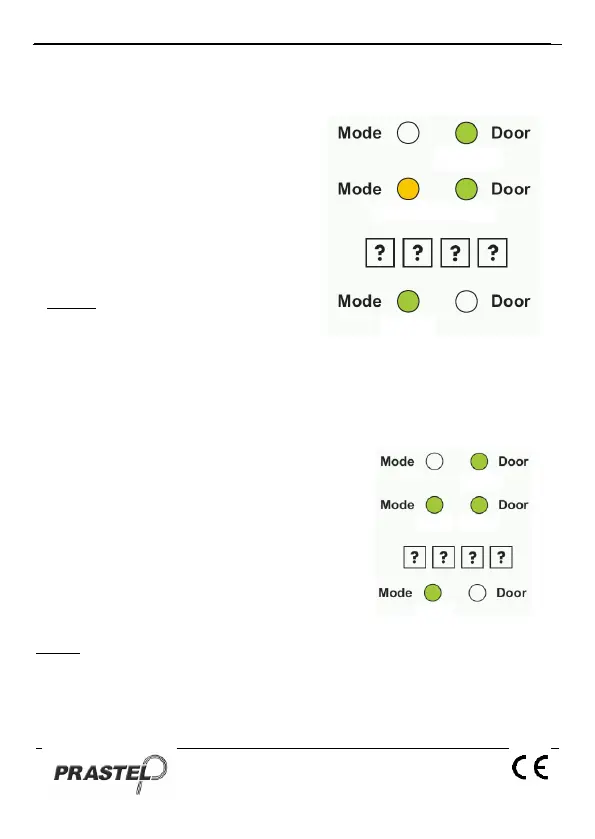
1. Enter Programming Mode.
2. Press "2" to enter Menu 2. The
Mode LED will turn orange.
3. Insert the new “Auxiliary Code”.
4. The EASYBKA/R returns to
Normal Mode: you will hear
three beeps. The Door LED will
turn off and the Mode LED will
turn green.
NOTE
Auxiliary Code does not
work in Secure Mode and
only works when the Auxiliary Mode is 0, 1, 8 or 9.
Code 0000 will erase and deactivate the Auxiliary Code.
12. Changing the Programming Code
1. Enter Programming Mode.
2. Press "3" to enter Menu 3: the Mode
LED will turn green.
3. Insert the new “Programming Code”.
4. The EASYBKA/R returns to Normal
Mode: the Door LED will turn off and
the Mode LED will turn green.
NOTE
Programming Code cannot be erased, i.e. the code 0000 is not
valid and will not erase the Programming Code.


 To Next Page