18.1 Deleting Primary and Secondary Codes using the
Standard Method
1. Enter Programming Mode.
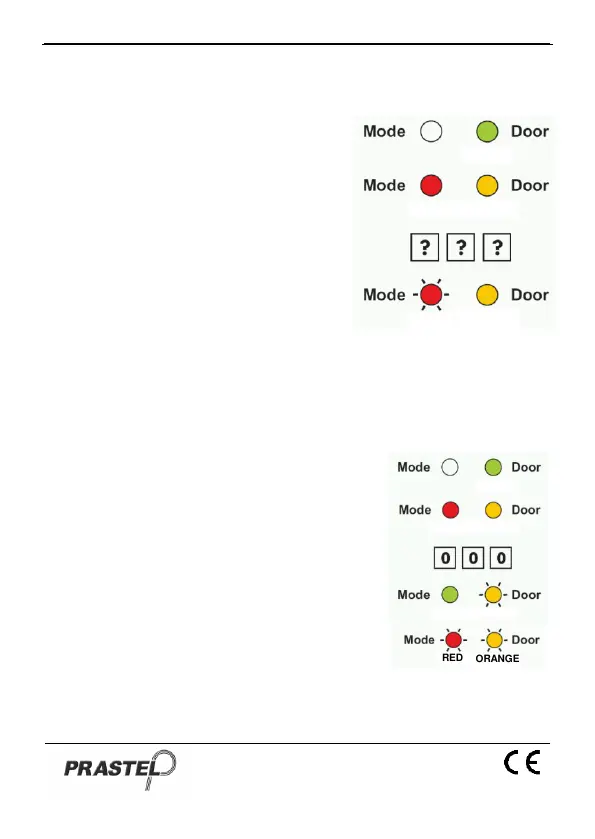
2. Press "8" to enter Menu 8: the
Mode LED will turn red.
3. Enter the 3-digit User Slot codes you
wish to delete: The Mode LED will
flash red indicating the controller is
waiting for the Programming Code to
confirm the deletion. If the User Slot
is empty you will hear a long beep
and the EASYBKA/R will return to
Normal Mode.
4. Enter your Programming Code to
confirm the deletion: If the Programming Code is valid, you will hear
three beeps and the EASYBKA/R will return to Normal Mode (If the
Programming Code is invalid, you will hear a long beep and the
EASYBKA/R will return to Normal Mode).
18.2 Deleting Primary and Secondary Codes using the Code
Search Method
1. Enter Programming Mode.
2. Press "8" to enter Menu 8: the Mode LED
will turn red.
3. Enter the 3-digit User Slot 000: the Door
LED will flash orange.
4. Enter the 4-digit PIN Code of the Primary
Code belonging to the user you want to
delete: the Mode LED will flash red (if the
PIN Code is invalid, you will hear a long
beep and the Mode LED will not flash).
5. Enter your Programming Code to confirm the
deletion: If the Programming Code is valid,
you will hear three beeps and the
EASYBKA/R will return to Normal Mode (If the Programming Code is
invalid, you will hear a long beep and the EASYBKA/R will return to Normal
Mode).


 To Next Page