19. Lock Strike Relay and Auxiliary Relay Code
Assignment using the Standard Method
When a Primary Code is enrolled for any user, that user is assigned
rights to activate the Lock Strike Relay when they present a valid code
to the controller. The Code Assignment Menu allows you to assign
whether the Lock Strike Relay and/or the Auxiliary Relay is activated
when a user enters a valid code. There are two methods to Assign
Codes, Standard Method and the Code Search Method.
19.1 Relay Code Assignment using the Standard Method
1. Enter Programming Mode
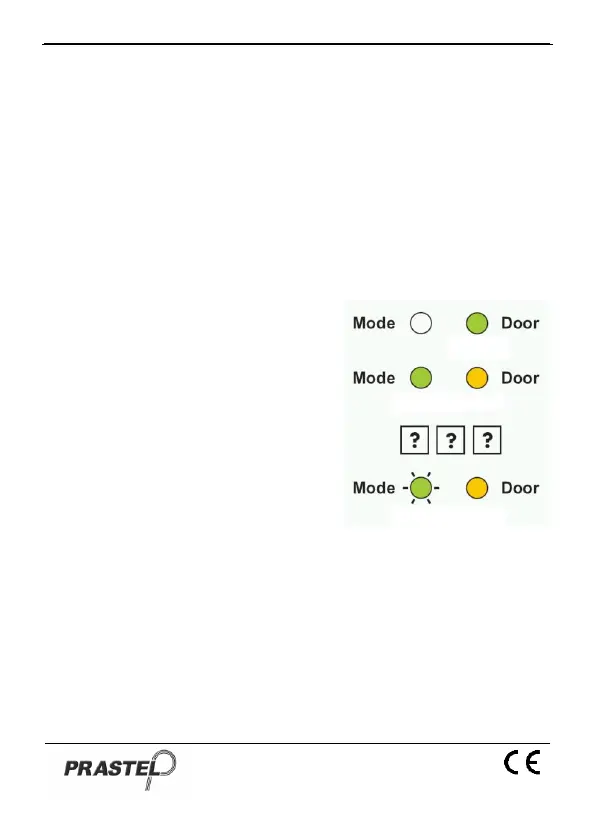
2. Press "9" to enter Menu 9: the
Mode LED will turn green.
3. Enter the 3-digit User Slot that
you want to assign a code to: The
Mode LED will flash green.
4. Enter the assignment digit for the
current User Slot:
"1" assigns the Lock Strike
Relay only
"2" assigns the Auxiliary
Strike Relay only
"3" assigns the Lock Strike and Auxiliary Relay
5. If the assignment code is valid the Mode LED will stop flashing
and the EASYBKA/R is now waiting for another slot number.
Press the "#" key to go to the next slot, press the "#" key twice to
return to Normal Mode.


 To Next Page