5.1 Changing the Modes of Operation
5.1.1 Changing from Normal Mode to Secure Mode:
The default factory setting for the Normal / Secure Code is 3838.
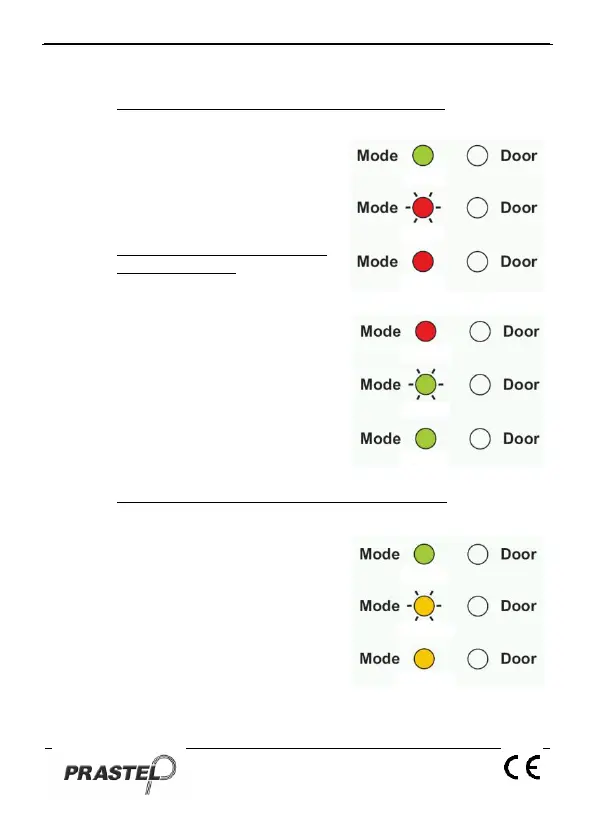
1. Insert the code. Mode LED will
flash red.
2. Press the "#" key to confirm the
Mode change. Mode LED is red.
5.1.2 Changing from Secure Mode
to Normal Mode:
The default factory setting for the
Normal / Secure Code 3838.
1. Insert the code. Mode LED will
flash green.
2. Press the "#" key to confirm the
Mode change: the LED will turn
green. The EASYBKA/R Auxiliary
Input can also be used to switch
the Mode of Operation from
Normal to Secure and vice versa.
(see par.13).
5.1.3 Changing from Normal Mode to Bypass Mode:
To set the Normal/Bypass code refer to par. 14).
1. Insert the code. Mode LED will
flash orange.
2. Press the "#" key to confirm the
Mode change. Mode LED will turn
orange.


 To Next Page