EASYKA – EASYBKA
________________________________________________________________________________________________________________________________________________________________________________________________
16
10. CHANGING THE AUXILIARY CODE
The Auxiliary Code is mainly used as a method to quickly test the Auxiliary Relay during installation. The
Default Factory Setting for the Auxiliary Code is 0852.
When the first user is added to the controller, the default Auxiliary Code will automatically be deleted, ready
for a new Auxiliary Code to be re-entered.
1. Enter Programming Mode.
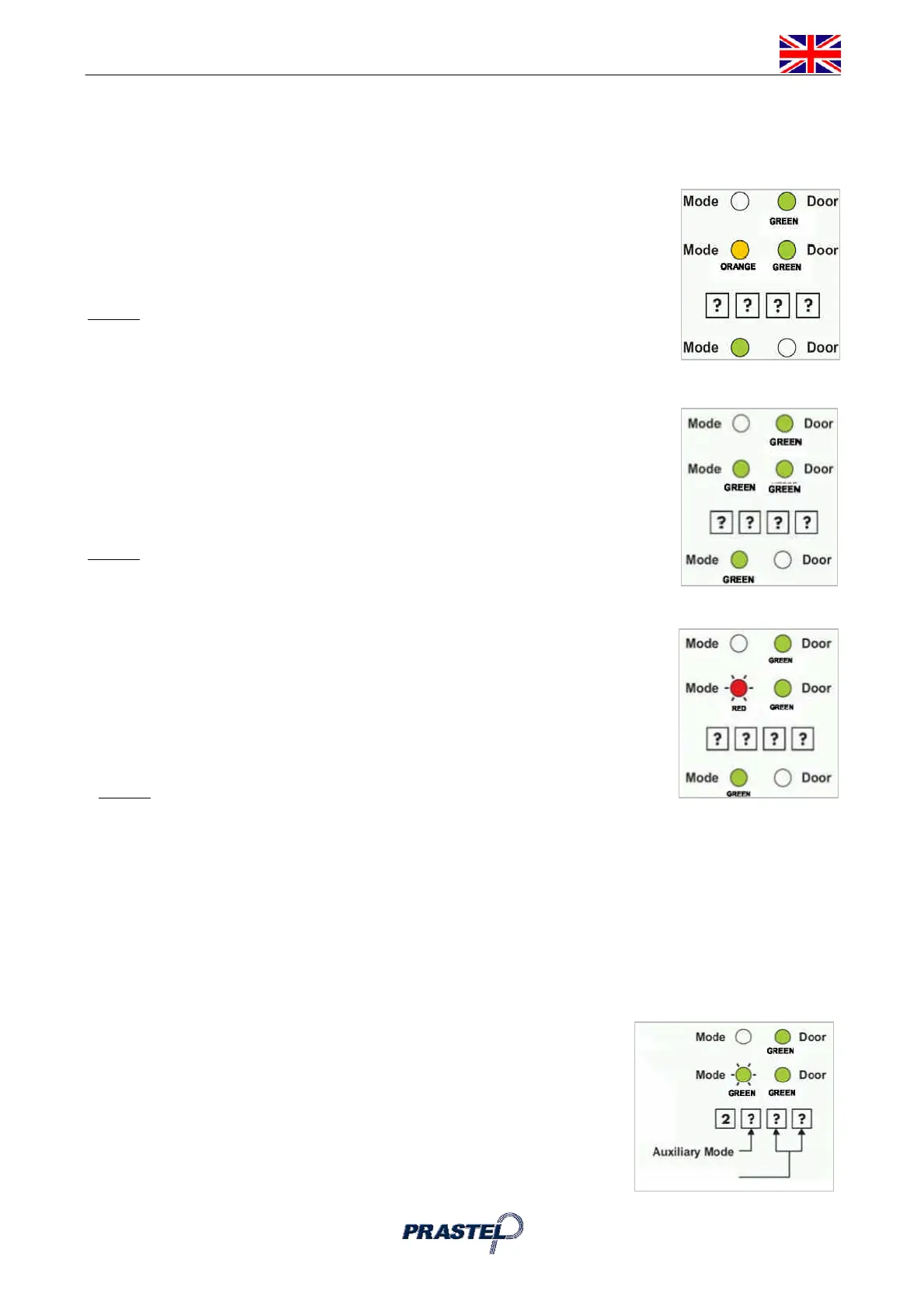
2. Press "2" to enter Menu 2. The Mode LED will turn orange.
3. Enter the new 4-digit code you wish to set as Auxiliary Code.
4. The EASYKA returns to Normal Mode: you will hear three beeps. The Door
LED will turn off and the Mode LED will turn green.
NOTE :
Auxiliary Code does not work in Secure Mode.
Auxiliary Code only works when the Auxiliary Mode is 1 or 2.
Code 0000 will erase and deactivate the Auxiliary Code.
11. CHANGING THE PROGRAMMING CODE
1. Enter Programming Mode.
2. Press "3" to enter Menu 3: the Mode LED will turn green.
3. Enter the new 4-digit code you wish to set as Programming Code.
4. The EASYKA returns to Normal Mode: the Door LED will turn off and the Mode
LED will turn green.
NOTE :
Programming Code can not be erased, i.e. the code 0000 is not valid and
will not erase the Programming Code.
12. CHANGING THE NORMAL / SECURE CODE
1. Enter Programming Mode
2. Press "4" to enter Menu 4: the Mode LED will flash red.
3. Enter the new 4-digit code you wish
to set as Normal / Secure Code
4. The EASYKA returns to Normal
Mode: The Door LED will turn off
and the Mode LED will turn green.
NOTE :
When the Auxiliary Mode is 1, 2, 3, or 4 the Auxiliary Input takes priority over the Normal / Secure
Code.
13. CHANGING THE NORMAL / BYPASS CODE
1. Press "5" to enter Menu 5: the Mode LED will flash orange.
2. Enter the 4-digit code (different to 0001) to enable Bypass Code. To disable Bypass Code enter the 4-
digit code 0000.
3. The EASYKA returns to Normal Mode: the Door LED will turn off and the Mode LED will turn green.
14. DEFINING AUXILIARY INPUTS/OUTPUTS
1. EnterProgramming Mode.
2. Press "6" to enter Menu 6: the Mode LED will flash green.
3. Construct the 4-digit
code using the
instructions below
L’EASYKA returns to Normal
Mode: The Door LED will turn off and the Mode LED will turn green.
Time Settings



 To Next Page