Page 17
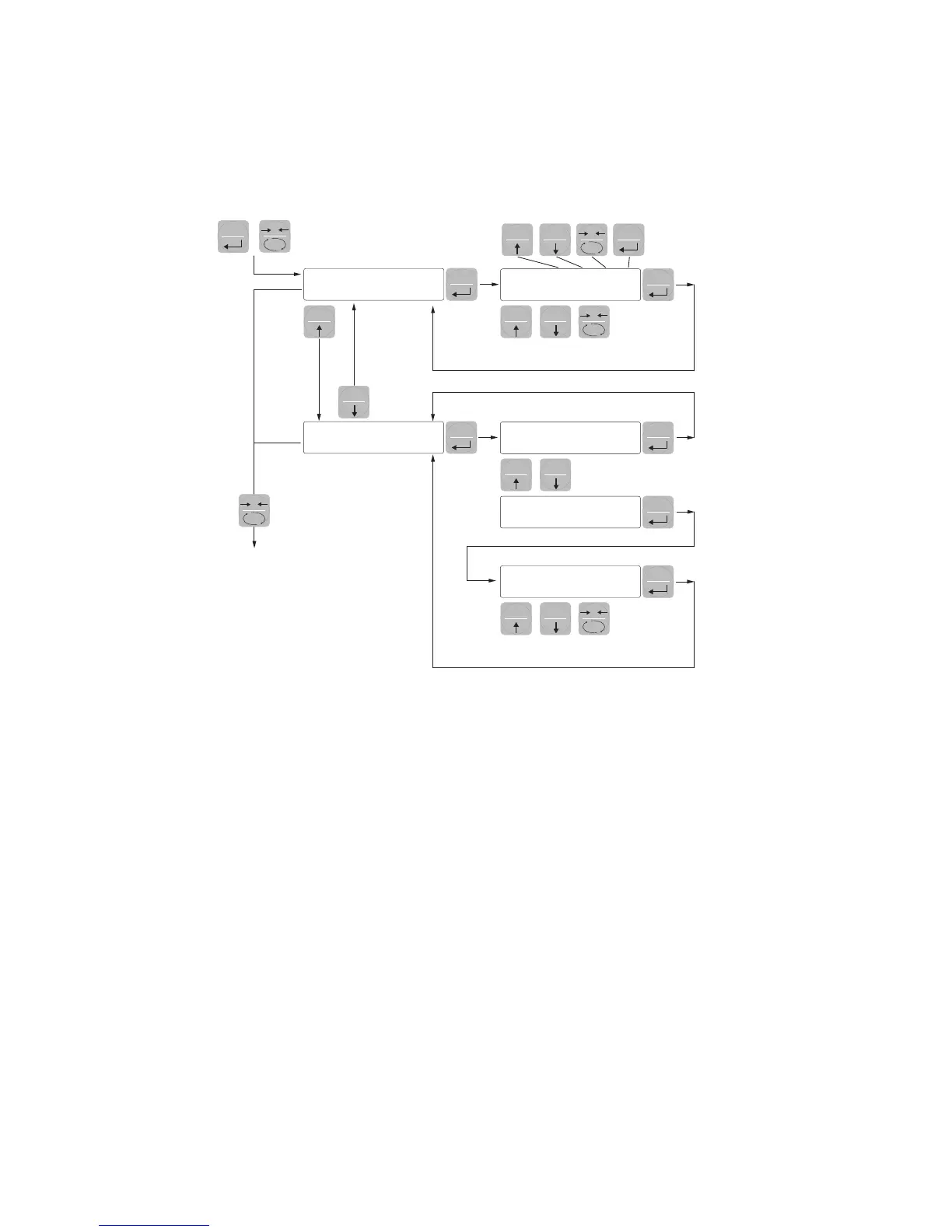
LOck
0000
blind
off
on
00
+
3 sec.
Select
digit
Change
selected digit
Select
digit
Change
selected digit
EXIT
KEYS CORRESPONDING
0
0
0
SET
SETSET
FUN
FUN
FUN
PRG
PRG
PRG
PRG
SET FUN
PRG
PRG
PRG
0SET FUN
PRG
0
KEYBOARD LOCK/UNLOCK FUNCTION
KEYBOARD LOCK/UNLOCK A function that allows you to enable or disable the keys individually.
When the keys are locked, the only way to access these settings is to press and hold pressed the PRG
+ 0 keys for 3 seconds. For more information on the function, refer to the block diagram above.
SWITCHING THE DISPLAY OFF This function allows turning off the display after a programmable time.
You can select ON / OFF of the parameter BLIND and the setting of a time; the time count starts from
the moment when, after exiting the setup menu, the display shows the weight value. After the set time,
the display turns off and only a dash appears. This dash cycles through the perimeter of the display
counterclockwise. When the display is off, also the 4 keys are disabled, regardless of how you set the
keypad lock (LOCK). The only way to access the settings will be PRG + 0.


 To Next Page