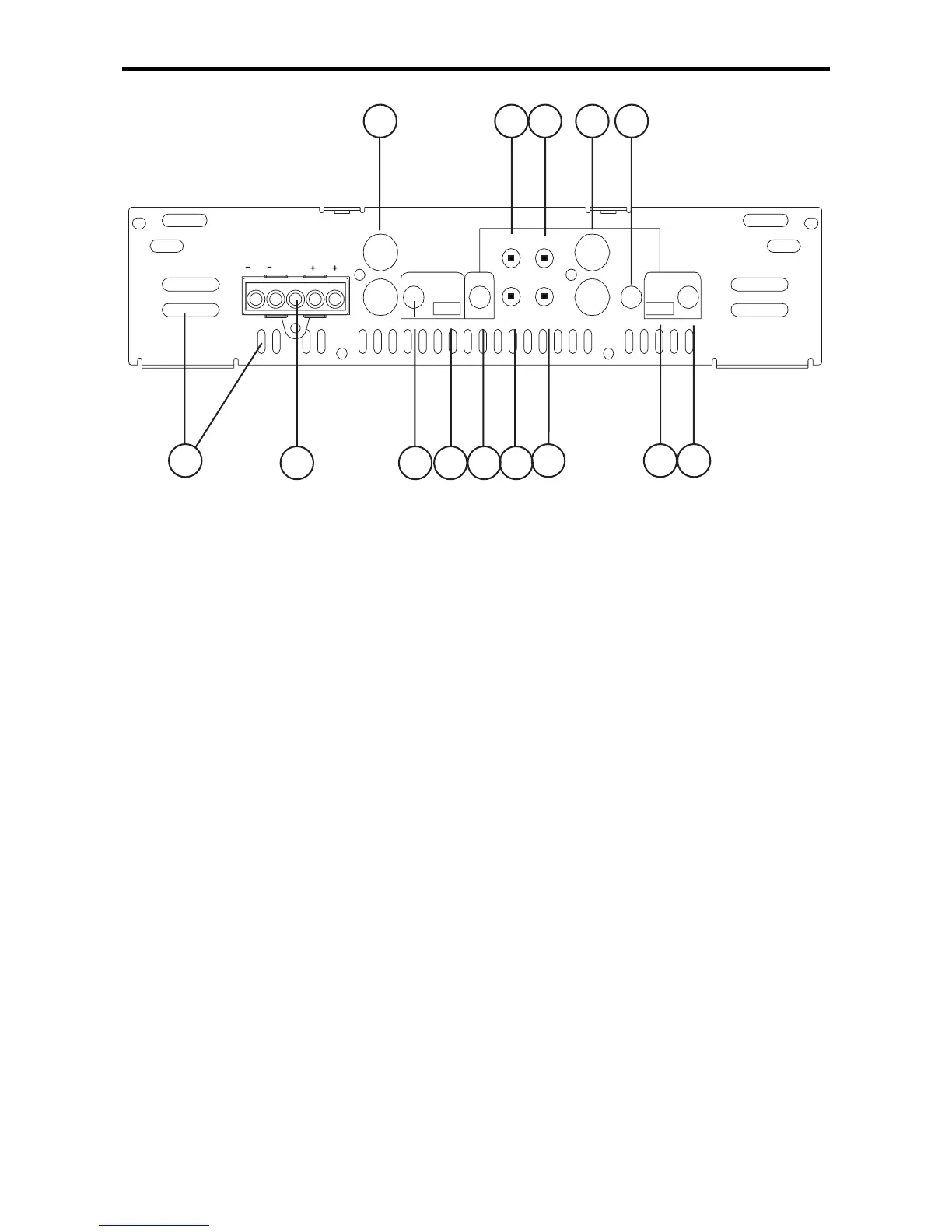
FRONT PLATE DIAGRAMS
1. Cooling Plenums: Maintain a minimum 2” clearance around
cooling plenums for proper amplifier cooling.
2. Speaker/Remote Connector: The
PowerLock
TM
speaker
connector.
3. Output Freq. Control: Use this control to adjust the sub bass
output signal crossover frequency from 30Hz to 4kHz. (See the
Crossover Frequency chart in this manual).
4. Output HP/LP/FULL Switch: Select the desired crossover
setting HP/LP/FULL for the signal of the RCA outputs.
5. LPF Frequency Control: Allows adjustment of the LPF between
30Hz and 250Hz.
6 & 7. QBASS
TM
1 and QBASS
TM
2 Freq.: Use these switches,
QBASS
TM
1
and
QBASS
TM
2
to program the
QBASS PLUS
TM
circuit
frequency.
8. Xover FULL/LP/HP Switch: Select the desired crossover setting
FULL/HP.
9. Sub Sonic Adjustment: Adjusts the crossover between 20Hz
and 100Hz.
10. Gain: Use this control to match the output level of the source
unit to the amplifier.
11. Input: Plug in the RCA leads from your source here.




 To Next Page