page 4
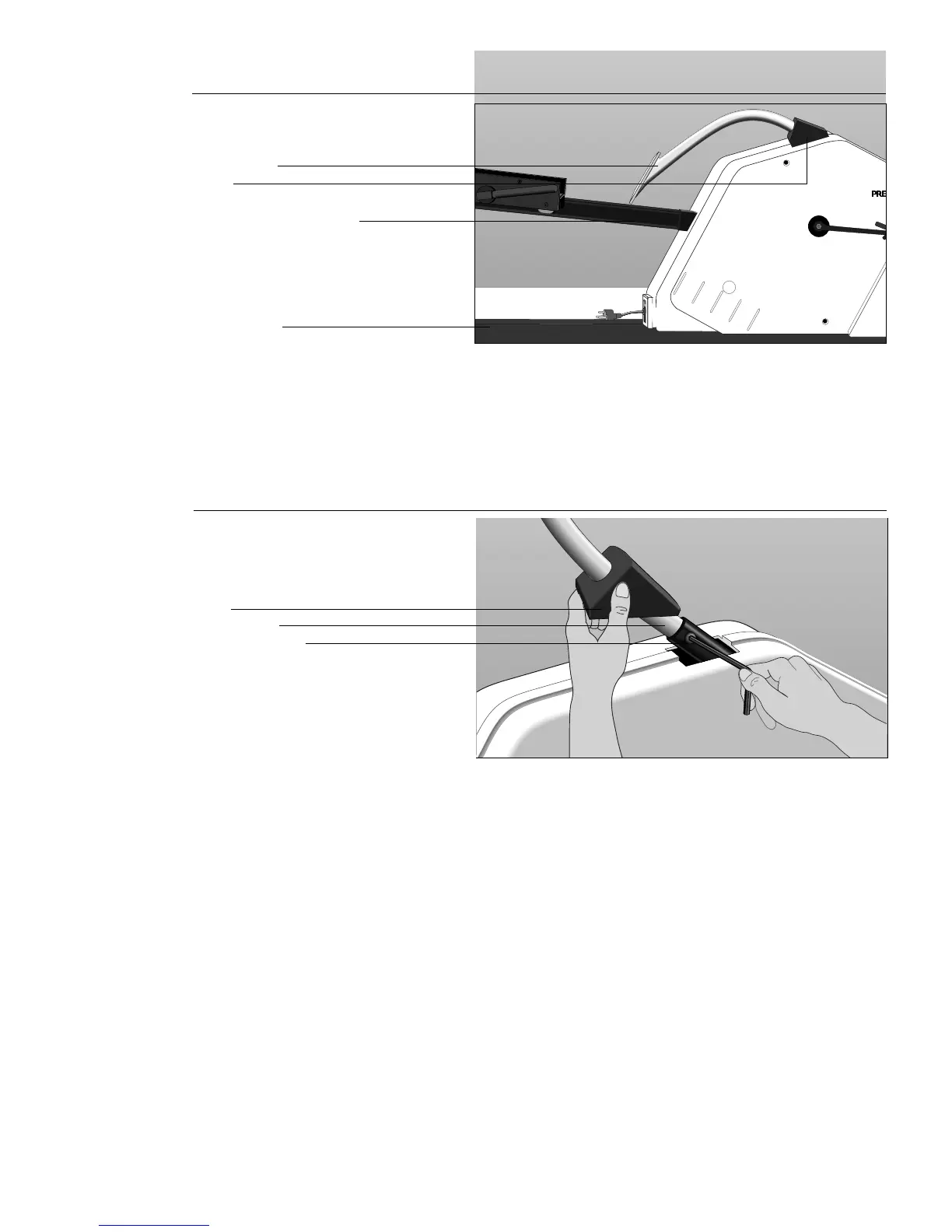
Sliding the boot
and loosening the
connecting bolt
Diagram 2
Display arm
Boot
Mid-column support bar
3. Slide the display arm boot up the display arm to expose the connecting
bolt. See Diagram 2.
4. Loosen the connecting bolt with the hex key (C) provided.
Moving the
display arm into
an upright
position
Diagram 3
5. With your hand, push the display arm into an upright (vertical) position. See
Diagram 3. Two indentations exist on the display arm approximately 145
degrees apart. In the first position, the display arm is down in the shipping
position. In the second position, the display arm is upright. You want to
align the connecting bolt with the indentation so that the display arm is held
properly in its upright position.
Note: You can adjust the length of the display arm at this time by carefully
pulling the display arm toward the rear of the cycle. A third indentation
allows you to raise the height of the display arm and its associated
electronic console display. Usually, you would move the display arm to the
third indentation only if you are a very tall person.
6. Once you have aligned the indentation and the connecting bolt, tighten the
bolt with the hex key (C) and return the boot to its original position by
sliding it along the display arm and re-seating it on the connecting bolt.
7. Unwrap the packing from around the electronic console.
Base frame
Connecting bolt
Display arm
Boot







 To Next Page