7
INSTALL UNIT I NTO WALL SLEEVE
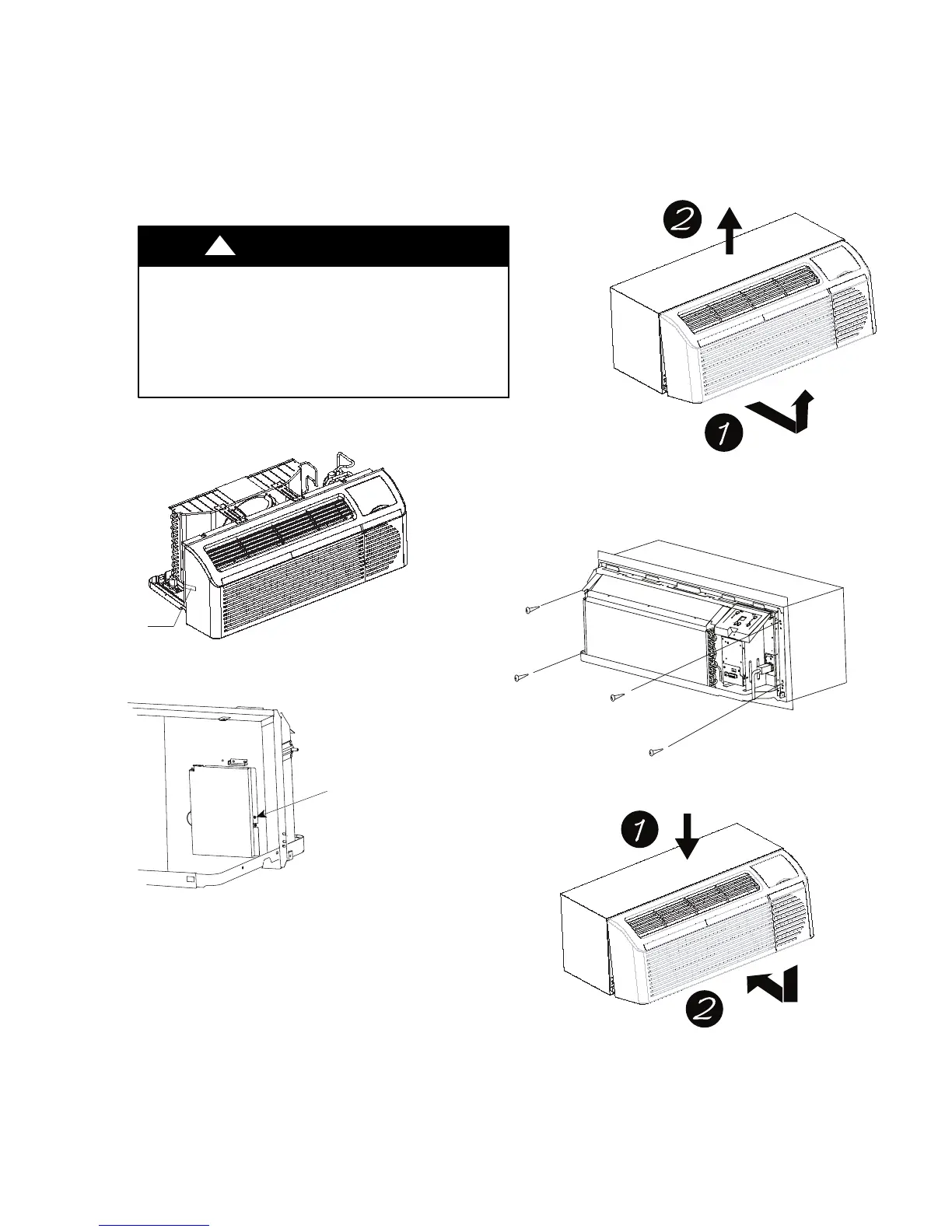
1. Carefully remove shipping tape from the front
panel and vent door. See
Fig. 9.
2. Remove shipping screw from the vent door, if
present. See Fig. 10.
3. Remove front panel. See Fig. 11.
4. Lift unit level and slide unit into wall sleeve
until foam seal rests firmly against front of wall
sleeve.
5. Secure with four screws (supplied) through the
unit flange holes. See Fig. 12.
6. Reinstall front panel. See Fig. 13.
UNIT DAMAGE HAZARD
Failure to follow this caution may result in equipment
damage or improper operation.
Failure to remove shipping tape and screw will prevent
fresh air vent door from opening and may result in damage
to vent door cable
CAUTION
!
Shipping
tape
Fig. 9 – Shipping Tape Location
Remove shipping
screw if present
Fig. 10 – Shipping Screw Location
Pull out at the bottom to release it from the tabs
(1). Th en l ift up (2).
Fig. 11 – Removing Front Panel
Fig. 12 – Securing Unit
Pl ace t ab s over t op rail (1). Push In ward at
bottom until panel snaps into place (2).
Fig. 13 – Replacing Front Panel



 To Next Page