3. Receive Mode Keyboard Commands
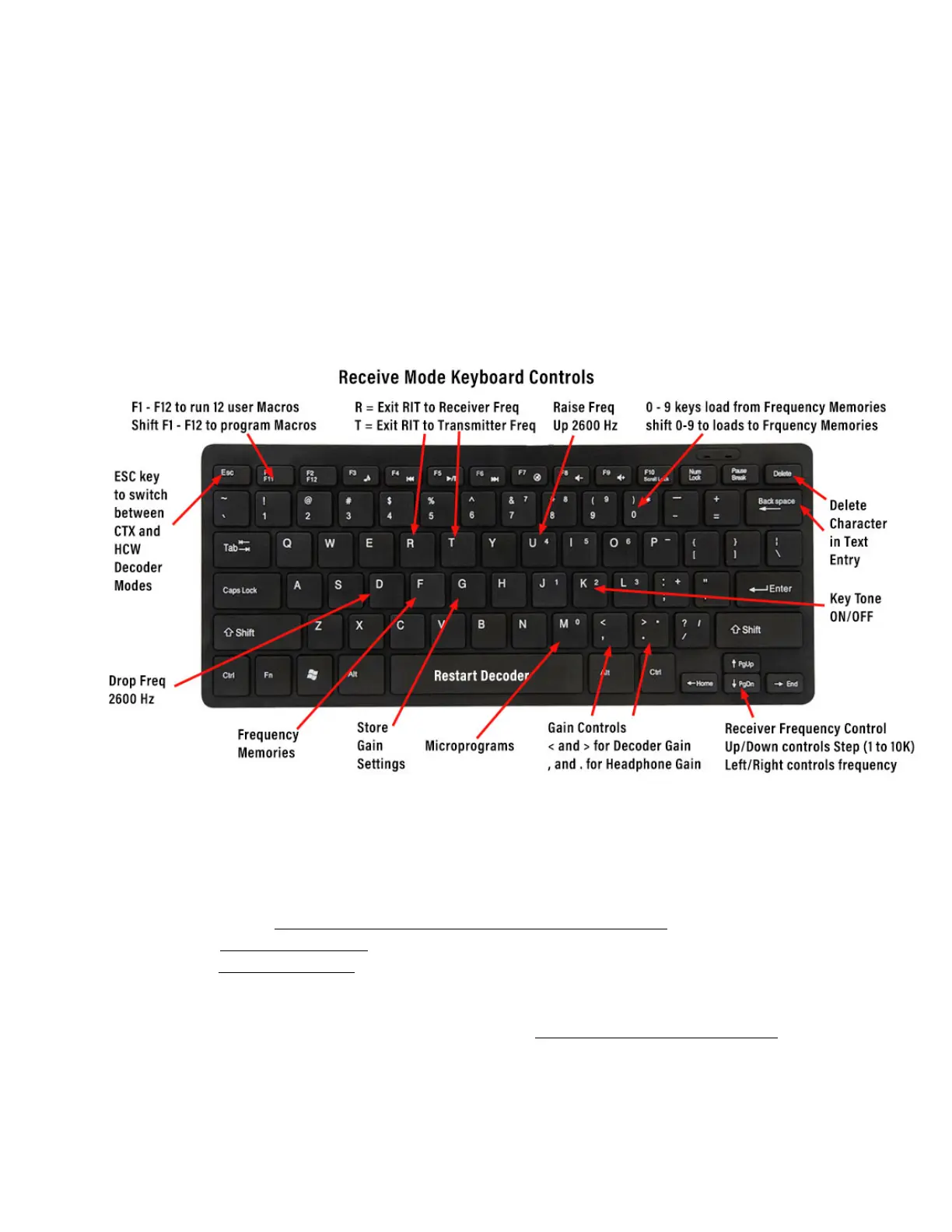
Figure 7 below is a diagram showing the receiver keyboard commands. You can tell
that you are in Receive Mode because both the CALL or ANS Button are BLUE. Press
MENU / HELP / RECEIVE for a summary of these commands. The commands are on
two separate screens, which you can access via the NEXT and PREVIOUS buttons.
The EXIT button will return you to the Main Screen.
Note that on the Help Screen, there is also help for TRANSMIT and MICROPROGRAM
commands, as well.
FIGURE 7: RECEIVE MODE KEYBOARD COMMANDS
There is a large version of this layout in Appendix VI of the DMX-40 Reference
Manual you can use print out and as a guide. For now, just note the following keys:
a. the 4-way Receiver Frequency Control keys (bottom right)
b. the Gain Control keys, (to the left of the frequency controls)
c. the Restart Decoder (space bar) key.
Note that the initial frequency display shows 7.030000, which is 7.03 MHz, and the
initial frequency step size of 1 Hz. 7.03 MHz is the small signal calling frequency for 40
meters.


 To Next Page