Battery Information
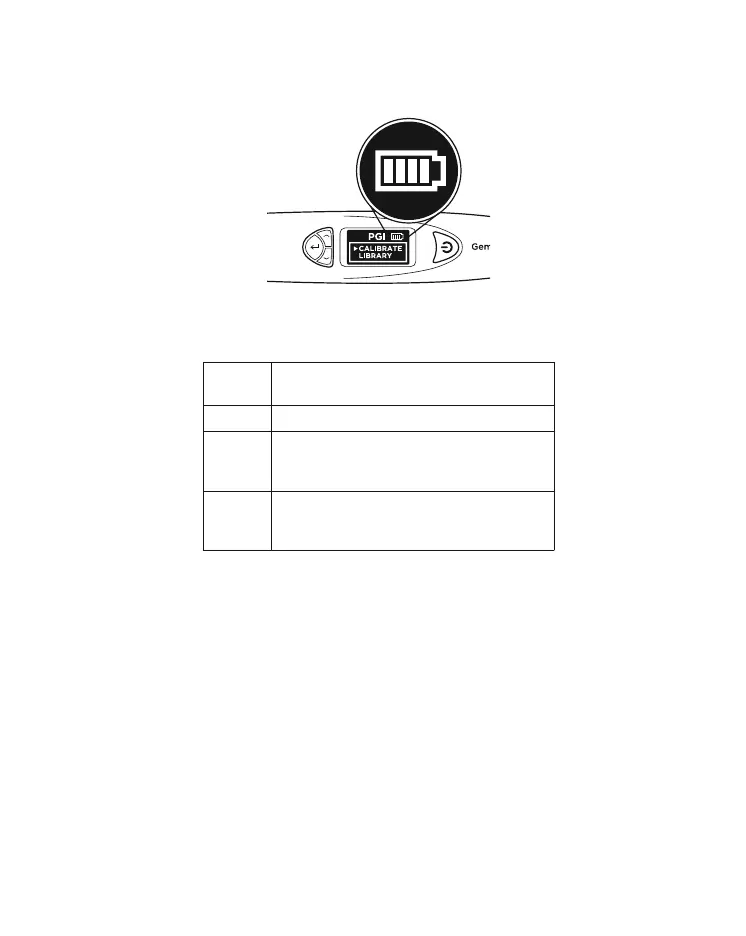
Battery life is indicated by the icon at the top right-hand
corner of the display screen.
Note: The power-saving feature will ensure the tester
shuts down automatically after 10 minutes of inactivity.
Do not leave worn out batteries in the battery compartment
as the batteries may corrode or leak and damage the
circuitry of tester. Batteries should be removed when
the instrument is expected to be stored for an extended
period of time.
Batteries do not have to be removed when the electrical
power via a power adaptor is used.
4 Bars Battery life is at least 75% or full 100%.
Tester may be used as indicated.
3 Bars Tester may be used as indicated.
2 Bars Battery life is about 25 – 50%. Tester is still
usable but it is recommended for the user
to recalibrate the tester at this stage.
1 Bar Battery life is low at about 0 – 25%. No test
should be performed. It is recommended
for the user to change to new batteries.
Fig. 1.17
16


 To Next Page