EasyManua.ls Logo

PRESONUS PS49 - All Notes Off; Reset All Controllers

PRESONUS PS49
18 pages
Print Icon
To Next Page IconTo Next Page
To Previous Page IconTo Previous Page
Loading...
4 Edit Mode
4.4 Program Change
PS49
Owners Manual
9
4.4 Program Change
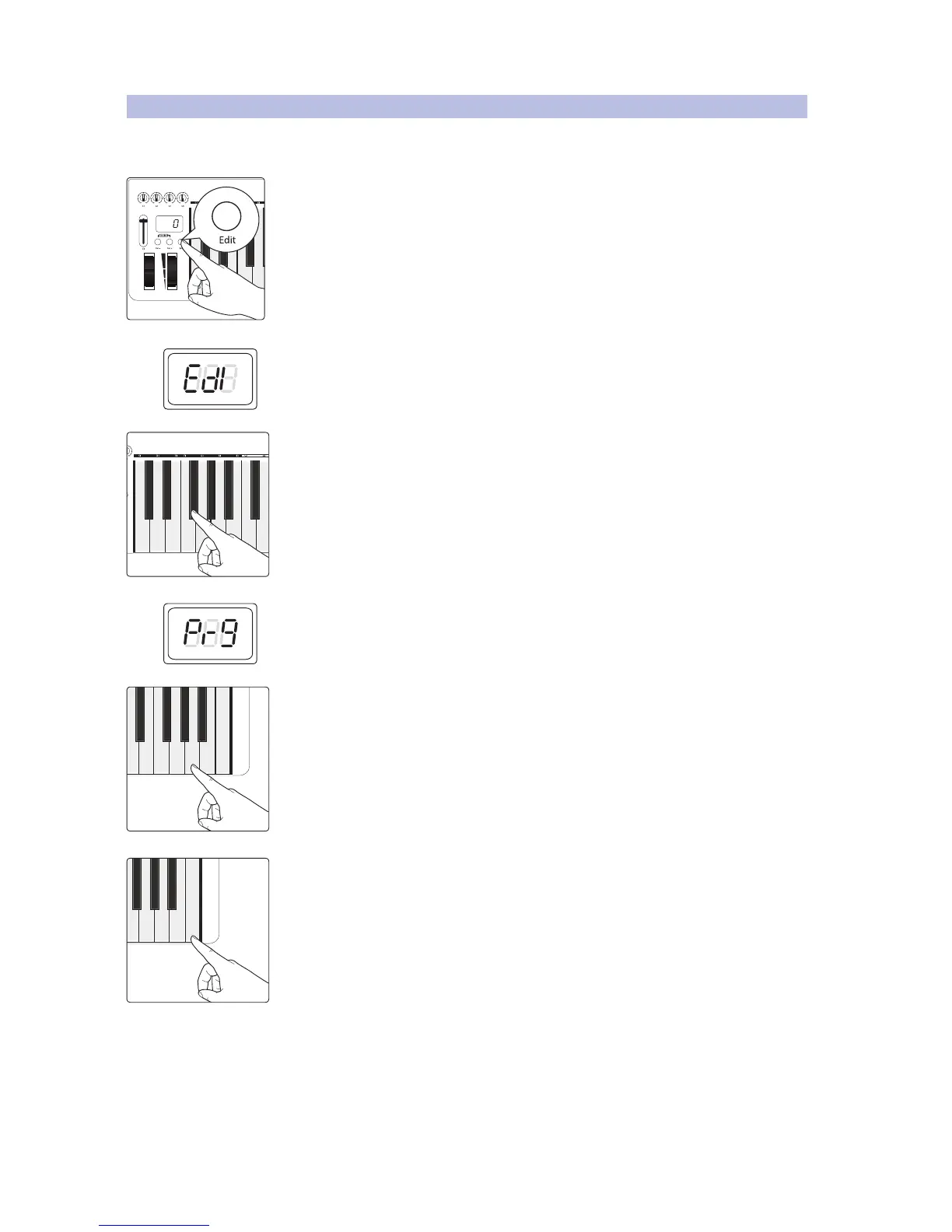
Use this key to send Program Change messages to
any MIDI instrument, device, or DAW.
1. Press the Edit button.
2. The LED display will blink “Edi.
3. Press the F#1: Program Change key.
4. The LED display will blink “Prg.
5. Enter the program number for the preset you want by pressing the corresponding
numeric-entry keys. For example, if youd like to use Program 8, press A4: 08. The
LED display will show the value you’ve entered.
6. Press C5: Enter to make your change effective and exit Edit mode.

C#1: Controller Assign
D#1: MIDI Channel
F#1: Program Change
G#1: Bank LSB
C1: Cancel
Pitch Bend Modulation
C#1: Controller Assign
D#1: MIDI Channel
F#1: Program Change
G#1: Bank LSB
A#1: Bank MSB
C#2: All Notes Off
C1: Cancel
C5: Enter
D4
4
E4
5
F4
6
G4
7
A4
8
B4
9
C5: Enter
F4
6
G4
7
A4
8
B4
9