“PreSonus”,“STUD IOLIVE” A ND “ACTI VE INTE GRATION” ARE REGIS TERED TRADEMARKS OF PRESO NUS AUDIO ELECTRONI CS
This device complies with Part 15 of the FCC Rules a nd ICES-003 f or Canada. Operation is subjected to the
following two conditions: (1) this device may not cause h armful interferenc e, and (2 ) this device must
accept any interference received, includ ing interference that may cause undesired operation .
WARNING:
Power down unit before removing option card
32 channel x 25 bus digital mix core
with 32 remote XMAX preamps
STUDIOLIVE RM32
S800S800
S800S800
S800S800
S/PDIF
Control Output
S800S800
S800S800
S800S800
IN OUT
S800S800
S800S800
S800S800
S800S800
S800S800
S800S800
MANUFACTURING DATE
SERIAL NUMBER
WARNING
:
TO REDUCE THE RISK OF FIRE OR ELECTR IC
SHOCK, DO NOT EX POSE THIS EQUIP MENT TO R AIN OR
MOISTURE. D O NOT REMOVE COV ER. NO USER S ERVICE ABLE
PARTS INSIDE. REFER SERVICIN G TO QU ALIFIE D PERS ONNEL.
AVIS
:
RISQUE DE C HOC EL ECTRIQUE — NE PAS OUVRIR
DESIGNED AND ENG INEERED BY P RESONU S • MANU FACTURED IN CHINA • P ATENTS PEN DING
“PreSonus”,“STUD IOLIVE” A ND “ACTI VE INTE GRATION” ARE REGIS TERED TRADEMARKS OF PRESO NUS AUDIO ELECTRONI CS
This device complies with Part 15 of the FCC Rules a nd ICES-003 for Canada. Operation is subjected to the
following two conditions: (1) this device may not cause h armful interferenc e, and (2 ) this device must
accept any interference received, includ ing interference tha t may cause undesired operation .
WARNING:
Power down unit before removing option card
32 channel x 25 bus digital mix core
with 32 remote XMAX preamps
R
STUDIOLIVE RM32
S800S800
S800S800
S800S800
S/PDIF
Control Output
S800S800
S800S800
S800S800
IN OUT
S800S800
S800S800
S800S800
S800S800
S800S800
S800S800
1
2
345
1
2
345
Network router
Ethernet
cable
Ethernet
cable
Touch screen
computer
FireWire
cable
Control
Control
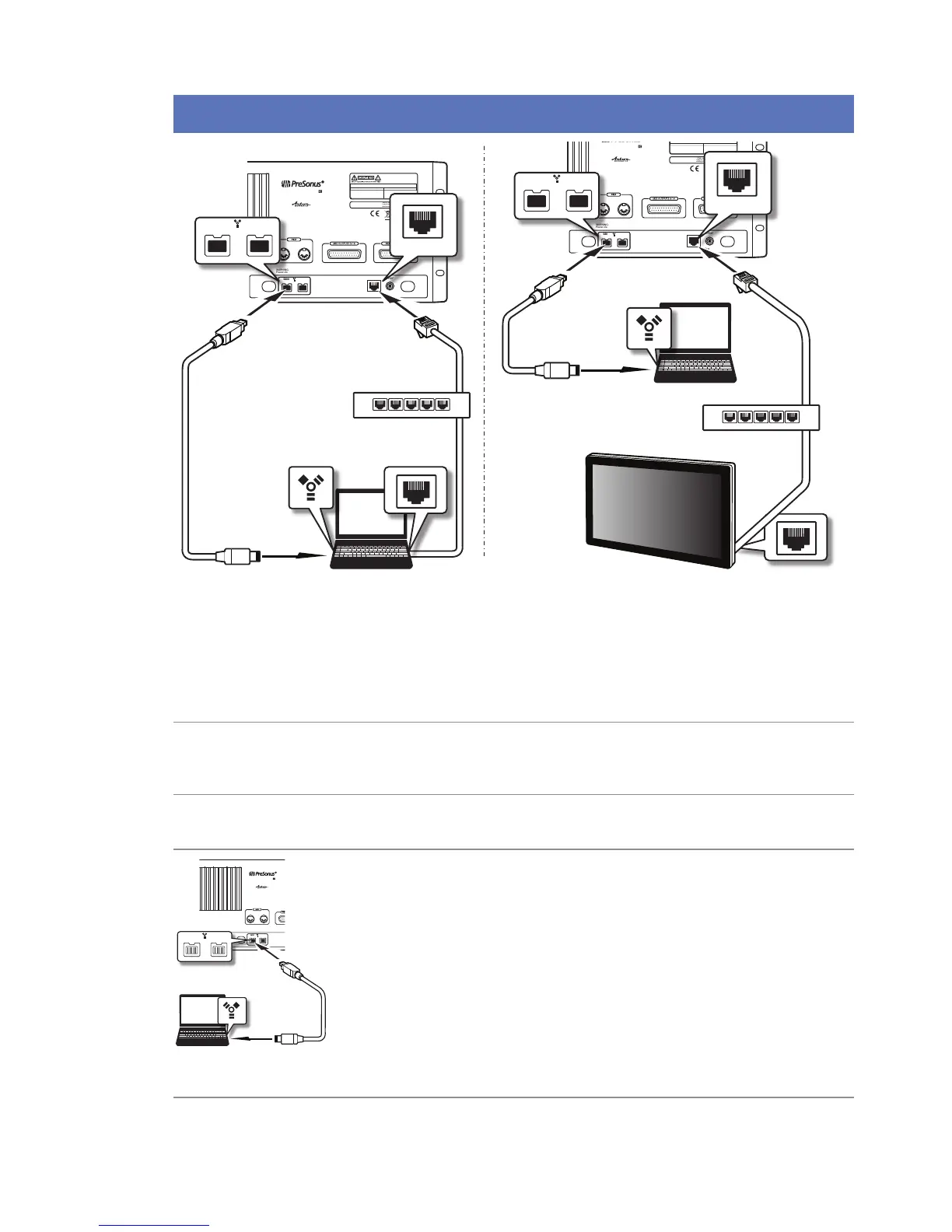
StudioLive RM32AI and RM16AI have been designed for tight integration with the included Capture and Studio
One Artist software. You can record a live show quickly and with condence to Capture, save the StudioLive AI
mixer scene with the Capture Session, and then open that recording, complete with mixer scene, in Studio One.
The Studio One mixer will be set to match your StudioLive AI mixer scene, including fader values, mutes, pan,
and eects-send mixes. Fat Channel settings will be loaded into Studio One’s new Fat Channel Native
Eects
™
plug-in.
You can also use the StudioLive AI mixer as an audio interface and monitor mixer for studio recording.
1. After registering your StudioLive AI mixer, download the Universal Control installer
for Mac or Windows from your My PreSonus account. This installer includes the
UC-Surface mix-control software and necessary drivers.
2. Launch the installer and follow the onscreen instructions. When the installer is
nished, reboot your computer to complete the installation.
3. When the installation is complete simply connect your StudioLive AI mixer to your
computer with the included FireWire cable.
4. For additional details and instruction on conguring your StudioLive AI as your
default sound input and output device, please refer to your manual and the video
guides in your My PreSonus account.
WARNING:
Power down unit before removing option card
32 channel x 25 bus digital mix core
with 32 remote XMAX preamps
R
STUDIOLIVE RM32
S800S800
S800S800
S800S800
S800S800
S800S800
S800S800
IN OUT
S800S800
S800S800
S800S800
S800S800
S800S800
S800S800
FireWire 800 cable
FireWire
cable
Network router










 To Next Page