The Power and Control Module (PCM) is a direct digital controller designed for pressurized underfloor plenum cooling and heating zones, specifically for interior and perimeter applications. It offers advanced zone control by combining the accuracy of direct digital control with the flexibility of an individual zone control system, aiming for maximum control and efficiency. The PCM comes in a rugged galvanized enclosure, complete with a 100VA transformer and a disconnect switch.
Function Description:
The PCM controller is an advanced and fully configurable underfloor ModuFlex cooling controller. It can be interfaced with one of four Price Thermostats to determine room load and allow for setup functions. With a variety of output configurations, the PCM can control up to 30 underfloor dampers, as well as auxiliary equipment using its auxiliary 24VAC binary outputs, and analog 0-10V outputs.
In cooling mode, an increase in space temperature causes the controller to regulate the dampers open, increasing the flow of cool air. If the space temperature exceeds the proportional band, the dampers' positions are maintained at their pre-selected maximum setting. Conversely, a decrease in space temperature causes the dampers to close, reducing cool airflow.
For heating, if connected to LFGH floor grills with integrated damper and reheat, the PCM will energize or modulate the heat proportionally to the room demand. If the space temperature drops below the proportional band, the dampers' positions are maintained at their pre-selected minimum setting.
The PCM can also be configured to accept 0-10V input signals from a BAS system or a third-party thermostat for room load calculations, instead of data from the thermostat. It can operate as a standalone unit or be interfaced into a BAS with the MS/TP BACnet network.
The PCM offers five thermostat options, providing control from room temperature sensing to motion sensing. The LCD Thermostat allows for balancing and system setup. The LCD Thermostat with Motion can also function as a motion-occupied zone and lighting controller, offering different levels of sensitivity while retaining all standard LCD Thermostat functions.
Important Technical Specifications:
- Control Capacity: Controls up to 30 underfloor dampers.
- Damper Connections: Modular connections using RJ-12 cables for standard dampers and RJ-45 connections for LFGH dampers.
- Output Protection: Outputs are protected by self-resetting thermal fuses, preventing damage to the circuit board in case of a damaged cable. A Fault LED indicates when dampers are trying to drive on an output with a damaged cable.
- Auxiliary 24VAC Binary Output: One output, rated for a maximum of 0.5A (12VA), usable for reheat, room lights, or signaling other equipment.
- Auxiliary Analog Outputs: Two outputs, fully configurable (2-10VDC, 0-10VDC, 10-2VDC), rated at a maximum output of 10mA each, for connection to other equipment or BAS.
- Analog Inputs: Two configurable inputs for 0-10VDC signals from a BAS system or third-party thermostat for cooling/heating control. Also usable for simple voltage monitoring.
- Thermistor Input: One 10K type J thermistor input, usable for temperature monitoring over the network or for heat/cool changeover.
- Thermostat Port: RJ-45 connection for thermostat from the PCM controller.
- BACnet Communication: Native BACnet MS/TP communication via RJ-45 cable or discrete twisted-pair wire to terminal block. Available speeds: 9600, 19200, 38400, 76800 (default).
- LED Indication: For troubleshooting, displays status, damper directions, BACnet status, and output fault.
- Power Supply: Pluggable terminal blocks for easy installation, high-voltage disconnect switch, max 100VA multi-tap transformer with circuit breaker.
- Enclosure: Metal safety guard separating high and low voltage areas, four grommeted openings for modular cable connections.
- Temperature Sensor Input: For monitoring.
- Disconnect Switch: Included.
- Pluggable 24VAC Power Terminal: Included.
- Power Requirements: 24VAC, 47-63 Hz 6VA (not including output loading) NEC Class II.
- Ambient Ratings: 32° to 131° F (0° to 55° C), 10 to 90% RH (non-condensing).
- Inputs: Thermistor Sensor (10k Type J thermistor), Analog 0-10V inputs (x2, 20k ohm input impedance), Thermostat Inputs, Room Setpoint Dial.
- Communication Ports: BACnet MS/TP Connection (optional), LINKER port for local setup.
- Enclosure Size: 15.5 in. x 12.75 in. x 4 in.
- Enclosure Weight: 15 lbs. (6.8kg).
Usage Features:
- Installation: Requires a 20A circuit breaker for building installation. The PCM should be placed in the underfloor plenum in the center of the controlled zone. Supply power and ground must be connected by a certified and licensed electrician.
- Damper Connection Rules: Connect no more than 30 dampers total, daisy chain up to 6 dampers per output. Standard dampers (RJ-12 plug) should not be connected to LFGH outputs (RJ-45 plug). LFGH dampers (up to 12) count towards the 30-damper maximum.
- Thermostat Installation: CFLEX thermostat cable connects the thermostat to the PCM's "T-Stat" port. The thermostat should be mounted on a wall, away from direct sunlight, outside walls, hot equipment, and pressurized walls, ensuring unrestricted vertical air circulation.
- Thermostat Types:
- Room Sensor Thermostat: Measures room temperature. Setpoint adjustable via a hidden dial or through Price LINKER/BACnet. Occupancy button for system override.
- Dial & Wireless Thermostat: Measures room temperature, features a dial adjustment and occupancy button. Setpoint limits adjustable via Price LINKER/BACnet. LED light indicates mode (cooling, heating, neutral). Wireless version requires a receiver.
- LCD Thermostat: Measures room temperature, features an LCD screen with push button setpoint adjustment. Setpoint limits, balancing, and setup functions available through menus or Price LINKER/BACnet. Can add CO2 and humidity measurement.
- LCD Thermostat with Motion Sensor: Includes motion sensor for occupancy detection and lighting control, in addition to all LCD Thermostat features.
- Display Navigation (LCD & Motion Thermostat only):
- Initial Startup: Displays start-up screen, firmware version, loading parameters, controller type/firmware, sequence programmed, MAC address, device instance, and room temperature.
- Service Menu: Allows balancer/installer to access controller setup. Accessed by holding 'Enter Menu' for 5 seconds and entering passcode (Down-Up-Up-Down). Includes sub-menus for Balancing, VVT, Setpoint, Input, Output, Address, and Stat Setup.
- Balancing Menu: Forces damper open/close/min/max for regular and LFGH dampers.
- VVT Menu: Sets damper and LFGH cool/heat min/max positions, neutral supply air position, and damper runtime.
- Setpoint Menu: Sets day setpoint low/high limits, temperature units (°F/°C), night heat/cool setpoints, proportional band, day differential, and control source (thermostat or analog input).
- Input Menu: Displays supply air temperature, sets neutral mode (Force Cool, Dynamic, Conventional, Force Heat), and allows setting of hot/cold switch points and room temperature offset.
- Output Menu - Aux Binary: Configures auxiliary binary output as heat output, cool output, heat and cool, deadband output, room lights, force off, or force on. Sets trip point for load activation.
- Output Menu - Analog Outputs: Configures analog heat/aux cool/aux heat/aux deadband min/max/idle voltages.
- Stat Setup Menu: Configures occupancy source, motion sensor enable/sensitivity/test, HVAC timeout, lights timeout, LCD backlight (always on/off/button push), and sound options.
- Info Menu: Displays controller status (room load, damper position, BACnet Address info). No values can be changed here.
- Address Menu: Sets MAC address (hardware or software), device instance, and baud rate (9600, 19200, 38400, 76800).
- BACnet Networking: Uses supplied 35' CAT 5 cables or field-supplied hardwired cable. Networks must be daisy-chained, with no more than 30 devices per segment, and segment lengths not exceeding 1050 feet.
- Termination: BACnet MS/TP networks must be terminated twice (beginning and end) with 100 ohm resistors to reduce reflections and noise. Price controllers have DIP switch #8 or software menu option for termination.
- LINKER - USB Service Tool: Interface for connecting a laptop to the thermostat's service jack via a USB A-B cable and RJ-12 cable for setup and balancing. An LCD Thermostat can also be used for full system setup.
Maintenance Features:
- Troubleshooting Guide: Provides solutions for common issues such as:
- Controller not responding/no power: Check thermostat lights, 24VAC power with a multimeter, cycle power.
- Dampers not moving/red FAULT light: Check for shorted cables in the damper string.
- Damper acting erratically: Check for shorted CW/CCW lines in the cable.
- 24 VAC Binary Outputs not functioning: Ensure 24VAC power, call for heating/cooling, green indication light on, and check triggering device (relay).
- Analog Outputs not functioning: Ensure 24VAC power, check analog output voltage with a multimeter.
- SAT Sensor Analog Input not functioning: Ensure sensor is wired correctly (10k Ohm Type J Thermistor).
- BACnet Communication Errors:
- Termination: Price devices do not use EOL or termination at low baud rates; terminating can cause more problems.
- Network Speed: All devices on the network must run at the same speed (9600, 19200, 38400, 76800).
- Binary Address: Each device must have a unique binary address (1-99), set via DIP switches on the PCM.
- Grounding and 24VAC Polarity: Proper grounding is essential to prevent communication problems and voltage spikes. Ground every 24VAC transformer common/neutral to earth ground. Ensure 24VAC HOT and COMMON are not reversed, as this will prevent output signals from working correctly.
- Electrical Noise: Avoid routing high voltage lines (Variable Frequency Drives, high current power lines, fluorescent light fixtures) next to BACnet network wiring to prevent interference. If necessary, cross noisy electrical lines at right angles.

 Need help?
 General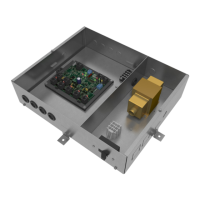

 To Next Page