14 Mid-size Scooter Series
EN
II. YOUR SCOOTER
IDENTIFICATION KEY
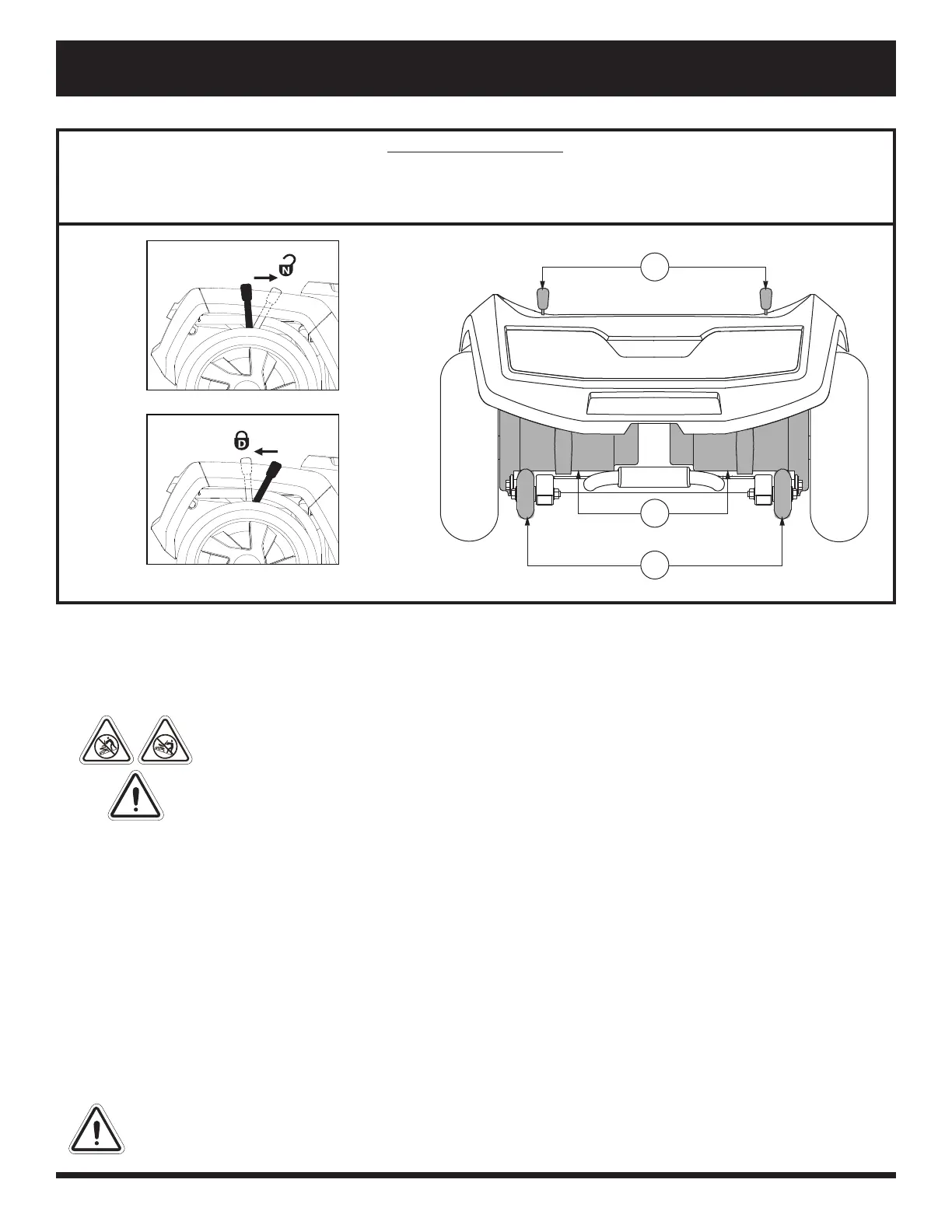
1. MANUAL FREEWHEEL LEVERS
2. MOTOR/TRANSAXLE ASSEMBLY
3. ANTI-TIP WHEELS
Figure 7. Rear Components - 710ZT
Freewheel Mode (Drive Disengaged)
Drive Mode (Drive Engaged)
Manual Freewheel Levers - 710ZT
For your convenience, your scooter has a manual freewheel lever on each motor. Manual freewheel levers enable
you to disable the drive system in order to maneuver the scooter manually. See fi gure 7.
WARNING! Do not use the scooter while the drive motors are disengaged! Do not
disengage the drive motors when the scooter is on an incline or decline, as the unit
could roll on its own! Only engage the freewheel mode when on a level surface.
WARNING! It is important to remember that when your scooter is in freewheel mode,
the braking system is disengaged.
NOTE: It is strongly recommended that you do not charge your batteries while in freewheel mode.
NOTE: You must turn off the power before disabling the drive systems; otherwise, you may get an error code
on the scooter. To clear this code, turn off the scooter and place the scooter in drive mode. Then turn on the
scooter. The error message should be cleared. If not, contact an authorized Provider.
To engage or disengage the drive system:
1. Locate the levers on the rear section of the scooter. See fi gure 7.
2. Pull the two levers toward the front of the scooter to disengage the drive motors (freewheel mode).
3. Push the two levers toward the rear of the scooter to engage the drive motors (drive mode).
If a lever is diffi cult to move in either direction, rock your scooter back and forth slightly. The lever should then
move to the desired position.
WARNING! Do not use the freewheel lever handles as tie-down points to secure this product.
1
3
2



 To Next Page