J6 with NE, NE+, and Q-Logic Electronics Technical Troubleshooting Guide www.pridemobility.com 9
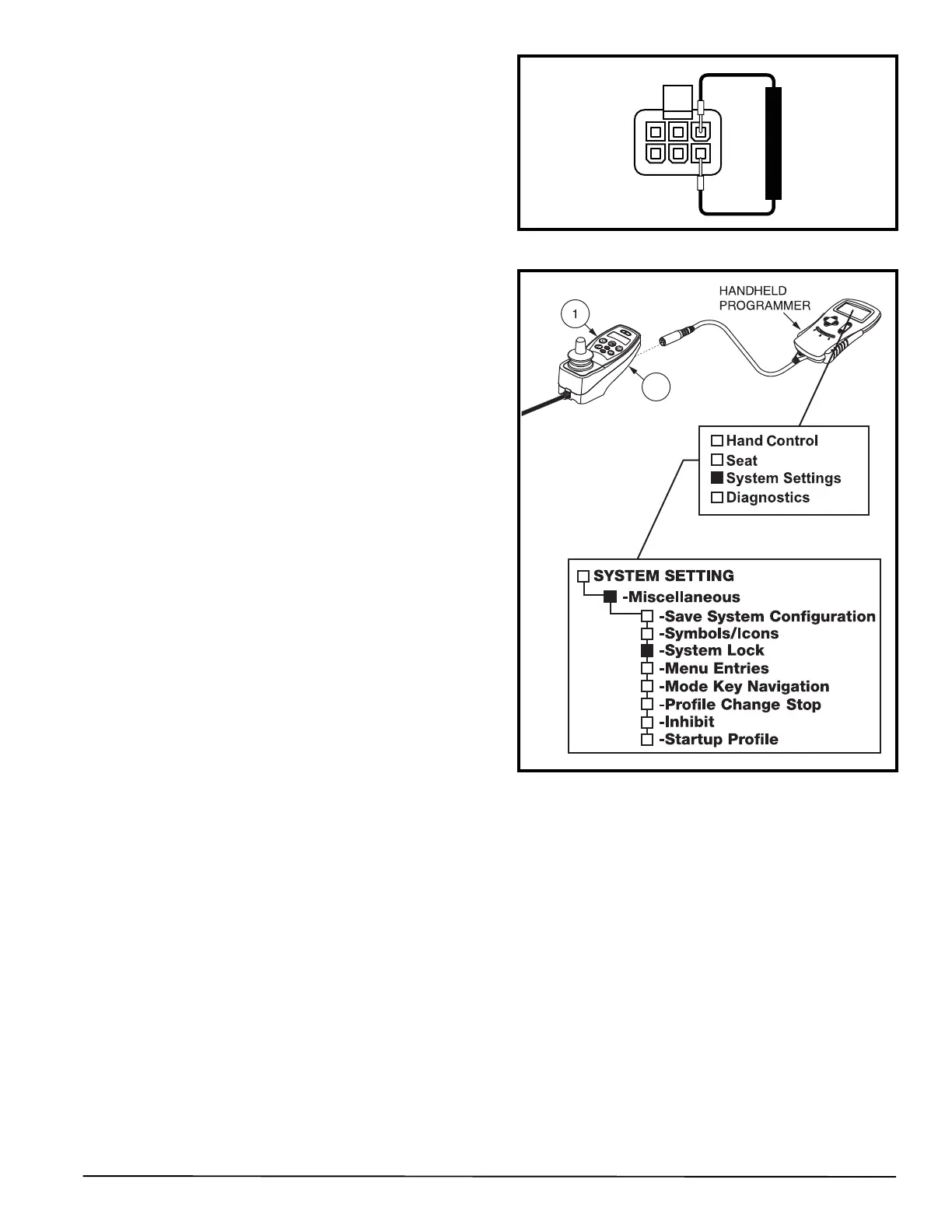
Figure 10. System Lock Controller Programming
(NE and NE+)
Figure 9. Connector 3b
16. Plug connector 3a back into connector 2a. See diagram
5 or 6.
17. Unplug connector 3b from connector 1b. See diagram
5 or 6.
18. Measure voltage across pin 1 and pin 4 of connector 3b.
See figure 9.
— If the multimeter indicates 0VDC,
then replace the BUS
cable extension (3) and retest the system.
— If the multimeter indicates greater than 0VDC, then
replace the NE, NE+, or Q-Logic joystick module (1)
and retest the system.
SECTION 2 - POWER CHAIR WILL
NOT DRIVE DUE TO SYSTEM
LOCK
NE Electronics
Symptoms:
The J6 powers on, but the NE joystick
module (1) allows no other functions.
The NE joystick module (1) displays a key icon on the
LCD.
The batteries are fully charged.
All electrical components are properly connected.
Diagnosis:
The power chair is in System Lock mode.
NOTE: System Lock must be enabled (ON) in order to lock
out the NE joystick module (1). Refer to the programming
text. See figure 10.
Solution:
Use the following procedure to release the NE joystick module
(1) from System Lock mode:
1. Turn on the power to the NE joystick module (1).
2. Deflect the joystick to the full forward position until an
audible beep is heard.
3. Deflect the joystick to the full rearward position until an
audible beep is heard.
4. Release the joystick. The LCD screen returns to normal.
To lock the controller:
1. Press and hold the power button until the system shuts
off. The system is now locked.



 To Next Page